
Table of Contents
Today seems like the perfect time for ranking, organizing and comparing what we think are THE laptops of the last couple of months and what will probably be some of the most popular computers of the next couple of years: ultrabooks.
We are going to quickly compare in the following lines all the important ultrabooks already released on the market, including the Asus Zenbook and VivoBook, the Acer Aspire S, Lenovo IdeaPad and ThinkPad, Samsung Ultra, Dell XPS and some of the other important lines of ultraportables from HP, Toshiba and all of the known brands we haven’t mentioned yet.
We’re mainly talking about the 13.3 inch ultrabooks in this post, but the latest update has also added some details about the newer Asus Zenbook Prime, the HP Envy 6 and the Spectre XT, the Sony Vaio T13, the Dell Aspire M3, M5, S5 and S7 or the Dell XPS 14 and 15. And check out the post periodically, I’ll update it from time to time with extra details.
If you’re looking for specific details on the bigger 14 and 15 inch machines, you can find them in this other post here.
If you’re also looking for what I consider the Best Ultrabooks of the moment, based on my hands-on experience with these machines, this other post here on the site is the one you MUST read.
We’re not going to get into many details in this post though, I’m going to insist on the most important features and specs, trying to find out if there is one ultrabook today that manages to detach itself from the rest and be the best choice for a technology enthusiast. For more details about each portable laptop in particular, check out our reviews posted here on the site in the dedicated category.
Design and build quality
In order to get the ultrabook name, a computer needs to be thin. And that comes associated with a nice looking shape and a pretty light weight as well.
Many ultrabooks available today come with full metal casings. Aluminum is usually the material of choice, but there are exceptions that also use magnesium or fiber carbon, like the Lenovo ThinkPad X1 Carbon, Acer Aspire S5, Dell’s XPS 13 and Fujitsu’s LifeBook U772. These materials does not make the laptops necessarily more robust, but help keeping the weight down.
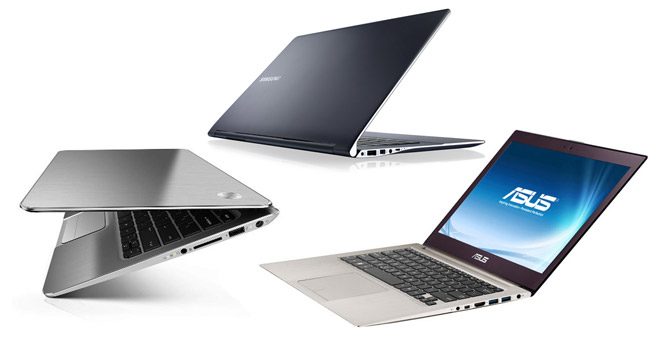
Ultrabooks and thin, light and fancy looking
On the other hand, the budget entries only use metal for the lid cover and the interior, while the bottom and the frame are made from plastic. Plus, you will find some cheaper ultrabooks that have dropped the aluminum all-together for the all classic plastic, like some Dell, HP and Toshiba 14 and 15 inch options.
Talking about footprints, most 13.3 inch ultrabooks are about 0.7 – 0.8 inches thick and weigh around 3 pounds. There are once again exceptions, with the Dell XPS 13 having a smaller body than most of the other ultrabooks, the Toshiba Z935 being the lightest and the slimmest of the pack, while the HP Folio is a bit on the heavy side, weighing 3.3 pounds. Of course, as we step towards 14 or 15 inch ultrabooks, they tend to become more massive and heavier, but they are still significantly more portable then the regular laptops in their classes.
But which is the most stylish and the best built ultrabook? That’s up to you to decide, as there are enough models and styles to satisfy all your needs, from classy and sober models like the HPs or the Lenovos, to fancy and extravagant ones, like the Dell and the Asus machines. My favorites right now in terms of looks and build quality are the Dell XPS 13, the HP Spectre XT and the Lenovo X1 Carbon.
Keyboard and touchpad
Unfortunately, while in terms of design, most of today’s ultrabooks have managed to get very close to Apple’s MacBook Air, as far as their keyboards and touchpads go, almost none of these ultraportable computers are right there on par with the MBA, as very few offer a truly good trackpad+keyboard combo.
You do get very good keyboards on all the Lenovo, HP and Dell machines, with responsive and comfortable keys. The Asus Zenbooks and Vivobooks are OK as well, but only if you’re looking at the second generation Zenbooks, with chiclet keyboard. Some of the Toshibas, Sonys, Acers and Samsungs have good keyboards as well, although they tend to get too flat to offer a proper feedback. But of course it’s difficult to actually have all these laptops in the same pot and try to compare them, as things differ from case to case.
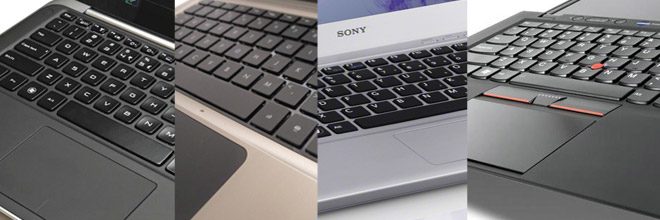
Finding a good keyboard/trackpad combo on an ultrabook is not an easy task
When it comes to trackpads, the Lenovos, Samsungs, Dells and HPs offer decent solutions, although most of them use integrated click buttons and I’m not a big fan of these. Asus, Sony and Acer on the other hand have had issues with their trackpads in the last years, as they were either too cramped on the Acer’s, or jumpy and oversensitive on the Asuses and Sonys.
Some of these ultrabooks also featured backlit keyboards, and you can find more about them in this other article you can find over here.
Bottom point, most of the keyboards packed on ultrabooks these days are a bit shallow, thus the typing experience isn’t great. There are however some decent options even for a heavy typist like me, as mentioned above.
Screens
Most of the affordable 13.3 inch ultrabooks available these days sport standard 1366 x 768 px glossy displays (TN panels), with slight variations between the better (on the Toshibas or Dells) and the worse ones (on some Lenovo, Sony and Acer machines) in terms of contrast, viewing angles and color reproduction.
There are some laptops offering 1600 x 900 px LCDs as well (Lenovo X1 carbon, Dell XPS 14, Asus Zenbook UX31E, Samsung Series 9 Ultra).
On the other hand, many of the premium ultrabooks you can buy these days offer Full HD IPS screens, which can be found especially on the new convertible ultrabooks that feature a touchscreen, also called hybrid ultrabooks. More about them in this other post.
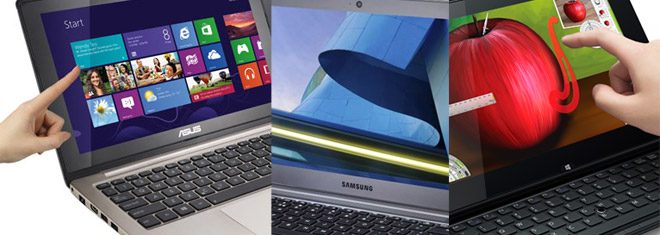
There’s a wide range of displays you can find on ultrabooks these days
There are some options that offer matte displays as well. On the Asus Zenbook there’s even an amazing IPS Full HD screen, while on other laptops like the Lenovo X1 Carbon, Samsung Series 5 Ultra or the Toshiba Portege Z830/Z930 you can get lower resolution non-glare displays.
Hardware and performances
In terms of hardware, there’s a common ground between most of the ultrabooks we can find in stores, but also a couple of distinctive elements and details. Most of today’s ultrabooks are built on Intel ULV hardware platforms, come with 4 GBs of RAM and integrated graphics. We get to choose between two families of processors, the older Sandy Bridge platform and the newer Ivy Bridge, bundled with Intel HD 4000 graphics. Haswell, the new generation of Intel ULV platforms is going to hit the stores in 2013 as well.
We are of course talking about ULV processors here, but they are snappy enough for all your basic tasks and even multimedia playing, although they are goig to be somewhat slow when dealing with massive photo/video editing or 3D rendering, which aren’t actually things one would usually do on an ultrabook. This post will tell you a bit more about what ultrabooks can or cannot do.
Some of the modern ultrabooks can also handle games as well, especially those featuring dedicated graphics, although they are a rare commodity in the 13.3 inch class, but more common in the bigger 14 and 15 inch segments. Still, don’t expect to run the latest titles on high details on those, that’s not going to happen. A selection of the best gaming ultrabooks of the moments is available here.
There’s one more aspect to mention: the storage solutions. While most producers bundle 128/256 GB SSDs on their default configurations, some chose to go for hybrid storage, with a regular HDD and a smaller SSD for caching, in order to save costs. With this approach, there’s also a drop in speed and overall snappiness, both in everyday use and especially when talking about booting and sleep resuming times. Almost all the big ultrabooks producers went down this road for their cheapest models, but they offer of course SSD only storage as well if you’re willing to pay more.
Battery life, connectivity and ports
Based on our battery tests, most available ultrabooks are capable of running for about five hours on a single charge, based on an everyday average use scenario.
There are exceptions though, like some Acer, Sony, Asus or Dell machines, that offer a smaller battery, hence will only run for 4 hours and a bit. On the other hand, some HPs, Toshibas and Samsungs stretch to 6+ hours of average use on a charge.
Of course, those numbers will vary a lot based on what you’re running on your machines. It’s extremely important to understand that we are of course talking about real-life battery life figures, and not those fancy numbers announced by producers (as most claim that their ultrabooks can run for 7 to 9 hours on a single charge).
More on what you should expect from ultrabooks in terms of battery life in this other post, also from our site.
One thing I should notice though is that most ultrabooks come with encased batteries, while the Sony Vaio T13 is among the very few to feature a regular detachable battery.
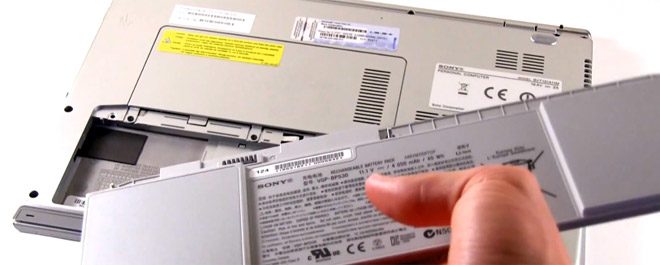
Batteries are encased on most ultrabooks, but there are exceptions
In terms of connectivity and ports, all these ultrabooks come with the basics, including WiFi, Bluetooth, USB and HDMI, but there are a couple of small details that could make the difference in this area, too.
As a general rule, most affordable ultrabooks, since they are slightly bulkier than the premium lines, offer pretty much all the needed ports and connectors, including card-readers, HDMI, Ethernet and so on.
ON the other hand, the high-end line sacrifice utility for the looks and the thin body, thus either completely miss some features (the Dell XPS 13 for instance lacks an SD card slot), or use miniaturized version of them (mini VGA, microHDMI, only one USB port). If that’s the case, most producers bundle some adapters to the standard sized connectors, but not all of them, in which case you’ll have to pay extra for them.
Connectivity wise, I should mention that all the available ultrabooks come with Wireless N and Bluetooth. However, some also offer MiFi (share your Internet connection), WiDi or even cellular as extra options (some Fujitsu, HP, Lenovo, Sony or Dell models).
Pricing, availability and others
For the moment, it looks like the are two classes of ultrabooks.
The mainstream options, with bulkier bodies, HD ready screens, hybrid storage and so on sell for between $600 to $1000 or even a bit extra, based on the chosen configuration. Many of these laptops feature touchscreens as well.
Premium machines on the other hand start at around $1000 and can get to $1500 and beyond. For that, you get the sleeker cases, the premium materials, the higher quality screens, faster processors, SSD only storage and so on.
Most of the available ultrabooks are sold all around the world, but prices will vary from region to region. And of course, these machines are getting cheaper and cheaper as time goes by, so you might want to check for up to date info on those big shops, like on Amazon or BestBuy.
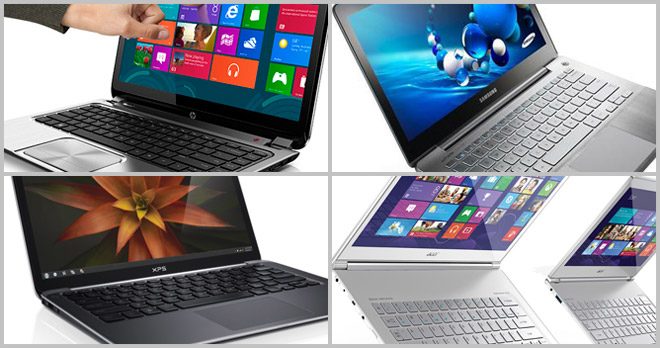
There are plenty of ultrabooks to choose from and the prices range from $500 to $1500 or even more
Final words
Comparing so many great laptops is not for sure an easy task, especially when trying to keep the ”story” as short and as straightforward as possible, without missing any important details.
However, I honestly hope that you will find this ultrabook comparison post comprehensive and thorough enough to at least help you make an idea on what are the best ultrabooks at the moment and what you should expect from them.
For more details, you should read all the post in our Comparisons category, plus see the reviews for all of the units listed here in the Reviews Section. Also, you can check out this other article, listing the top ultrabooks at the moment, to get an even clearer picture of what’s going down right now with these new, hip and strong pieces of computer equipment, the ultrabooks!
Of course, this post will be updated as other ultraportables become available, so stay tuned for extra details in the near future.
In the end, if there is anything that’s unclear about today’s ultrabooks, don’t hesitate to hit me up with a question in the ‘’comments’’ section below. I’ll be there to reply.



Anand U
August 15, 2012 at 5:15 pm
I am considering getting the Samsung NP530U4B-S01IN. As it seems to be well priced. Being a lawyer, I would like to use my ultrabook to do a lot of research and drafting, while at the same time use it for gaming, social networking and media function. Can you please tell me if there is a better model of laptop that I should opt for the above mentioned purposes? Does the availability of a DVD Drive add an advantage to the ultrabook or just make it bigger and heavier? I hate laptops which get heated and slow down in performance and want to ensure that this ultrabook is wise? Please help :)
Mike
August 16, 2012 at 4:55 pm
Anand, pretty much all the ultrabooks will do for what you want, expect the gaming part. That’s going to be an issue and if you want those, you’ll have to get a ultrabook with dedicated graphics. I’ve written about those here: https://www.ultrabookreview.com/367-ultrabooks-dedicated-graphics-dvd-touchscreen-rare-commodity/
Anyway, I for sure wouldn’t get the particular model, but rather the newer one: Samsung Series 5 NP530U4C-A01US . This is built on the latest intel ivy bridge hardware platform and is a bit snappier, while offering way improved graphics (you will be able to run older games on it, like WOW, call of duty: modern warfare 2, etc)
About the heat, most ultrabooks are alright, but if you’ll push them, the thin body will get warm, especially on the back.
Jay
August 17, 2012 at 10:30 am
Hey mike, i am an Architecture student, i want to buy an ultrabook, I need ultrabook which has 1GB graphics card, more than 4gb RAM, minimum 320 HDD, which will work with most of educational softwares like autocad and autodesk. I have a budget of $1000. For which ultrabook, i should go for?
Mike
August 19, 2012 at 3:26 pm
Jay, have a look at the Asus UX32VD, is the only 13.3 incher with dedicated graphics and hybrid storage available right now.
Naes
August 20, 2012 at 6:10 pm
Hi Mike! Appreciate all the comments you’ve put up so far. I’ve done a lot of research but it seems like every laptop has at least one flaw that I can’t deal with. Could you possibly help me narrow down the options to something that has:
1) preferably 2 USB ports (one for a DAC and for the other I might use a mouse). I think I can live with one USB port… but I’m not sure.
2) Great touchpad. I type very well so a bad keyboard isn’t a problem but I do not want to carry a mouse with me so a good touchpad is a must.
3) Little noise and heat
I think those are my main concerns, though I do want a solid build, matte screen, fast boot time, etc. I don’t mind what size it is, as long as it is light.
In addition, I’d want something $1000 or below… And I have a question. If the batteries aren’t replaceable, does that one has to purchase a new ultrabook when it starts to detriorate?
Mike
August 21, 2012 at 9:28 am
Naes, all ultrabooks have at least 2 USB ports, so you’re good there.
As for the touchpad, it’s a bit tricky. Perhaps the best trackpads are on the Lenovo machines, the HP Folio 13, the samsung Series 5 and the Dell XPS 13, if I remember correctly. I’d stay away from the Zenbooks and the Acers here.
Last but not least, most 13.3 inch ultrabooks run fairly cool. However, some of them can get quite noisy, like the Toshibas or the HPs. Still, none of them is noise free, the fans get active even when dealing with basic tasks and there’s always a slight buzz coming from them. And if you pick something with a HDD, there’s the noise from that one to be considered as well.
Divyam Raj
August 20, 2012 at 4:15 pm
Hi MIKE, i just want to know about ASUS new coming laptops is good or not in comparison to dell, lenovo and samsung?
Mike
August 20, 2012 at 4:57 pm
Which new coming laptops? if you’re talking about the 2nd gen Zenbooks, then yes, they are good, but you can’t compare them with all the laptops made by dell, lenovo or samsung. You can only compared given models…
Naes
August 20, 2012 at 6:16 pm
Actually I’ve been maybe thinking about getting a portable laptop, rather than an ultra portable one. I’m still not sure because I highly desire a fast boot time. But I never really liked the feeling of buying one model and seeing the “upgraded” newer models far surpass it. Could you perhaps recommend me a cheap portable laptop with the same criteria?
Mike
August 21, 2012 at 9:29 am
See this post: https://www.ultrabookreview.com/836-cheaper-ultrabook-alternatives/
Also, you should consider the Asus U32VD, I’ve written about it here: https://www.ultrabookreview.com/1370-asus-u32v-reviewed-appreciated-ultrabook/
Naes
August 21, 2012 at 6:51 pm
Thanks for the reply. I appreciate it. I've read practically all your reviews but I have not seen that Asus U32VD yet. It seems fantastic for the price and I think I can handle 4 pounds. But how does it fare with the other Asus models I've looked into (U31SD, U31SG, U32U) ?
Btw I'm also very intrigued by the Samsung Series 3. First of all, if I do go with these, I do not know if it is worth the money getting an i5 processor over a i3 one, since that seems to be the only difference between a NP350U2A and a NP350U2B. And to make matters more complicated, there seems to be a new model of the Series 3
Iono about you but that laptop has a somewhat ugly design. Maybe it'll look better in real life. But it is very cheap and seems to be an updated Samsung Series 3 model I was looking into.
I'd really appreciate it if you could help me choose between the Asus and Samsung, and their respective models. They both seem pretty damn good. Thank you.
Naes
August 21, 2012 at 6:56 pm
I also forgot to add… do I have to manually replace the SSD myself? I’m no computer expert. I’d really appreciate a faster boot time. As for the price and the brand, I guess I have to research a bit more with that myself.
Mike
August 22, 2012 at 10:49 am
Yes. Replacing the HDD with an SSD is quite simple with most laptops that have a special bay on the back, that allows you to quickly access the storage drive and the memory.
However, what might be a bit tricky is moving your restore partition from the HDD to the SSD, you’ll need a desktop for that, so you’ll be able to connect both the HDD and the SSD and mirror the C partition on the HDD on the SSD. There are tutorials that show you how to do that, it’s not very complicated, you just have to follow a bunch of steps.
Mike
August 22, 2012 at 10:46 am
Well, the U32VD is built on the new Intel Ivy bridge platform and that’s pretty much the big difference between it and those other Us you mentioned. It also has a non-glare display, while those had glossy ones if I reckon right.
I’ve tested several Core i3 processor, they are not slow, but I’d rather get a Core i5, it seems like the better investment right now and this way you could keep your laptop for 2-3 years and not get greatly outdated.
As for the Samsung NP350, I’ve seen it and it’s quite nice. However, it’s built on the older Intel Sandy Bridge architecture, and not on the latest Ivy. Which means that it’s going to be a bit slower and packs significantly poorer graphics than the new line.
The NP300 is also a sandy Bridge laptop and it looks to me like the cheaper version of the N350, ditching the metal for plastic on the hood.
I’m not really sure if there’s any Ivy Bridge Series 3 available. Now, if you don’t plan to run any games or graphics dependent software, Sandy architectures will do fine, otherwise you should go for Ivy.
Naes
August 22, 2012 at 4:40 pm
Thanks Mike. I decided to go with the Samsung Series 3 with an i3 core processor. To me, the i5 won’t make a big difference. I don’t game and I mostly need the laptop for typing and browsing, though I’ll download quite a bit of music hopefully as well. The Samsung has a matte display as well, and for $520 dollars: wow it’s extremely cheap. This is like an ultrabook at half the price, and most importantly, with minimal design flaws. The reason why I didn’t go for the Asus is well, it’s heavier, has worse trackpad, and costs more. I would’ve gone for the Asus if I gamed or needed that extra hardware but I don’t. Thanks for the help Mike!
Mike
August 23, 2012 at 9:11 am
alright Naes, let me know how you like the laptop after a week or so, if you have the time :P
Kathy
September 19, 2012 at 1:12 pm
I want to buy an ultra book in the next few days. Before I buy I have a couple question. Is there an ultra book running Windows 7 that includes a multi-touch screen? I see that HP is releasing one with Windows 8, but I do not want to change at this point.
Second, what are the major difference between the Asus Ux31-rls8, UX31E-DH52, and UX31A-DB51. Its hard to tell by looking at the specs.
Thanks
Kathy
Mike
September 19, 2012 at 4:10 pm
all the touchscreen equipped ultrabooks will ship with Windows 8 and at the moment there isn’t any available in stores.
As for the zenbooks, I’ll detail that in an article soon. Long story short, the UX31E is the older version of the Zenbook, while the UX31A is the newer model. They both share the same body, ports and battery, but the UX31A has an improved screen, keyboard and trackpad and is built on top of the newer Intel Ivy Bridge hardware architecture that offers slightly better performances and way faster graphics, while running a bit more efficient (will last longer on a charge)
Mike
September 20, 2012 at 1:14 pm
Hey Kathy, this post should tell you more about the Asus UX Zenbooks: https://www.ultrabookreview.com/2061-asus-ux31a-ux31e/
Sid
September 21, 2012 at 7:57 am
Hi Mike,
I am looking to buy an ultra book in the coming week, whats the better choice, Macbook air 11, Sony T series or Lenovo? My budget is 1000 USD.
Thanks
Mike
September 21, 2012 at 9:30 am
For $1000 you could barely squeeze an Asus UX31A (it’s about $50 extra). If not, from the ones you mentioned, I’d probably go with the Lenovo… But that one is quite big.
If you can live with the 11 inch Air (it has fewer ports, smaller battery and no SD card-reader), then go for it. An an alternative, there’s also the Asus Zenbook UX21A you could consider, with a way better screen, also for $1000
Wendell Akita
September 24, 2012 at 8:14 am
Mike:
I wrote you a few months ago, looking for an 11.5 incher. It will be used only when we travel to watch DVD’s, check email and sports scores. Its use will be very infrequent since we have a desktop. I am wondering whether the new Ivy Bridge system will improve DVD watching, and if 1600×900 resolution is best for that. Will it be worth it to invest in the new system if I want to keep my netbook for 5+years? I also want something light, like under 3lbs, but those come with SSD drives, which I do not need. Help. I want to return my 14″ Toshiba P845-s4200 and get an HP 11.5″ with an AMD OS. Your thots please. Thanks
Mike
September 24, 2012 at 7:45 pm
Wendel, here’s how things go. First, 11.6 inchers are not very powerful.If you’re looking for something with AMD inside, those are heavier than 3 pounds and only offer 1366 x 768 px resolution. Second, you’ll have to use an external dvd unit to watch your movies. And thirs, it’s unrealistic to think a laptop will last you 5+ years, especially a low-power one like the 11.6 inchers you’re looking at. I’d say either go for something better (13 inchers with intel ivy broidge inside) or lower your expectations to something like 2+ years
POORNA
October 2, 2012 at 5:23 pm
Hi Mike,
I’m interested in ultra book which will be required for fast access and user friendly.
More ever service support should be available for easy access.
Pls suggest the to me which company and which type can be suitable.
Cost can be between Rs 50000 to 65000.
richard
October 6, 2012 at 1:57 am
I purchased a Asus u47A notebook. I am fine with the speed storage etc., but the keyboard and the touchpad are killing me. I am typing on a little toshiba nb 305 and it is 10 times better than the Asus. Thinking I will return the Asus. Any advice? I spent about $800 on the U47A and would like to stay in that ball park I don't do any gaming. Would like to stay in the 14 inch screen size Also, I used customer support for Asus and thought they were terrible.
Mike
October 6, 2012 at 8:48 am
Hey Richard.
Hmm, I haven’t tried the Asus U47A myself but from the looks of it, the keyboard is pretty close to the one on the Asus U32 lines. Now, I can’t really comment on the keyboard, maybe you can be more specific and tell me what exactly you don’t like about it. Asus keyboards are decent, but that’s about it. Still, I for one enjoyed the keyboard on their latest U32VD that I tested a couple of months ago (have a look here: https://www.ultrabookreview.com/1370-asus-u32v-reviewed-appreciated-ultrabook/ and let me know if it’s close or not).
Now, if you don’t like the keyboard, you should probably return the laptop. BUT, think about your alternatives first.
The U47A is built on a regular Intel mobile platform, the one found usually in 15 inch laptops, while ultrabooks and most of the other smaller laptops come with slower Ultra Low Voltage processors. that doesn’t mean that they are bad, but if you’re going to push the laptop, you’ll feel the difference (work with 20+ tabs, runs programming software, virtual machines, edit videos, work with huge excel files, etc etc). So I don’t know what you’re doing with your laptop, but you should consider that.
Now, looking at 14 inchers around $800… The Lenovo IdeaPad U410 should fit and that one has a good keyboard, decent trackpad, but a rather poor screen (probably pretty much on par with what you get on that U47A, based on my experience with Asus laptops). You could also look at the HP Envy 4 or maybe the Dell 14z, but… all these are built on ULV platforms.
Anyway, please get back with more details on those keyboard issues and more about what you’re planning to use the laptop for and I might be able to get back with more alternatives.
Erin
October 17, 2012 at 3:04 am
Hi!
This is really helpful, but I was just wondering if you would have any advice for me, I am a uni student who is looking for a light ultrabook that I can just fit in my bag between lectures, I do a lot of typing so would want a decent keyboard as well. I’m not too fussed with graphics because I don’t play games or anything, but just something that has good battery life and is a fairly low price preferably! I’m currently using a HP Pavillion DV6 which I love, but it’s quite heavy and overheats super easy, but if there’s anything with similar specs or screen then that would be awesome, this has a core i7 and does a great job with everything but super hard to carry around all day. I will probably only use it for assignments/notes/social media.
Thank you!
Mike
October 19, 2012 at 1:41 pm
Hei Erin, first, ultrabooks are not going to be as powerful as you DV6. after all, you can’t put the same hardware in a much slimmer and compact body…
So, I for one would go for a Core i5 processor, it should be alright for everyday tasks, running office software, browsing, watching movies, etc. A cheap option would be the HP Folio 13, that can run for 6-7 hours, has a good keyboard but is built on last year’s hardware, which means the graphics are poorer. Still, it can handle games, so it should be alright. One thing that’s annoying though is the cooling fan, that can get quite loud.
Another option would be the lenovo ideapad U310, but this one is slightly larger and heavier than the other ultrabooks.
also, the samsung Series 5 can be an option, but its keyboard is a bit poorer than the one on the other two mentioned above.
Anyway, I’ve reviewed all these devices, go ahead and see the reviews section in the menu on top of the page for more details. And if you need more help, let me know
Philip
November 3, 2012 at 3:12 pm
Hello Mike,
I am looking to buy a laptop with the following features:
– touch screen
– ability to fold screen full to use as (like) a tablet
– full HDMI port
– Ethernet port
– ideally 15″ to 17″ screen size + at least 6gb RAM & min 128SSD
I recently saw the Lenovo Yoga at Best Buy, and it was great, except that it did not have an ethernet port (I sometimes go to client sites where there is no wireless available).
Are you aware of any current or soon to be released models that
Mike
November 7, 2012 at 4:49 pm
Hmmm, 15 inch with a fold-able touchscreen… doesn’t ring a bell . There are some 15 inchers with a regular touchscreen , like the HP TouchSmart XT, but not with a foldable, convertible screen.
Anyway, if you can go for a 13 incher, you should also have a look at the Lenovo ThinkPad Twist. It only has Mini-HDMI and Mini DP though.
But, if there isn’t an Ethernet on the unit, you can use an USb to Ethernet adapter and that should solve the problem
anuj
November 4, 2012 at 7:47 pm
hi , i am confused between hp spectre xt with 256gb ssd and asus zenbook ux31a 256gd ssd.. which one i should buy? or if u have any other suggestion for same config n price.
Mike
November 7, 2012 at 4:43 pm
Anuj, I’d get the Zenbook, the IPS screen is like night and day next to the regular TN panel on the Spectre. Except that, the two are on par, with a slightly better keyboard on the Spectre XT.
Anuj
November 9, 2012 at 7:56 pm
How about Lenovo thinkpad twist?
It looks promising.
Mike
November 9, 2012 at 9:05 pm
It’s a nice one, I’ve mentioned it here: https://www.ultrabookreview.com/2218-top-ultrabook-convertible/
Glenn Lamb
December 20, 2012 at 2:04 pm
Hi Mike.
I am planning to buy (14-inch monitor) ultrabook with an optical drive but I observed most of it has none except Dell Inspiron 14z. Is it good and durable?
yogesh
December 20, 2012 at 6:39 pm
Hi Mike,
Thanks for all the efforts and guiding everyone.
I need a ultrabook for day to day office applications, mostly using outlook, word, excel, Pdfs, power point presentations and occasionally cad viewer.
I need ultra portable. With 4 – 5 hours battery. CD drive would be good to have But not must.
I have narrowed down on Samsung 540U3C AO1 with i3 processor.
I am happy with the rest of specs but concerned if i3 processor would be ok?
Currently I am using Toshiba Satellite U500 1DR with i5 processor & am generally ok with the performance.
What is your opinion about i3 processor of Samsung? will it meet my requirements?
thanks & best regards,
Yogesh
Anil Kannan
December 31, 2012 at 12:03 pm
Hello Mike,
I wanted your opinion in selecting a ultrabook. My requirements are the following:
13.3″ screen, I5 (3rd gen) processor, 4GB RAM, 500GB RAM (along with 32GB SSD), Windows 7 Home premium or higher, Battery life 5hrs min. Currently i am stuck up with the following Sony Vaio T 13125CN and Samsung NP530U3B-A02.
Which among the following is a better machine. Do you have any other suggestions? Awaiting your suggestions
bishal
March 26, 2013 at 3:16 pm
go for lenovo u410..it’s awesome….you can choose dell xps 14 too.but lenovo is great.
kamran
April 24, 2013 at 2:09 am
go for atleast an 15 with 4GB DDR3 or maore
sherly
April 27, 2013 at 6:01 pm
Hi,
I need help in selecting notebook/laptop. I need it to do HD video editing, so my requirements are:
I7 processor, 4GB RAM, 1000GB RAM, Battery life 5hrs min. I’m having difficulties to choose between Asus or Acer. Which one is better for me? Or do i have to pick other than Asus or Acer?
Really appreciate every comments.
ketan
August 10, 2013 at 3:39 am
Hello Mike
I need help in selecting notebook/laptop. I need it to do Engg & office work
, so my requirements are: WINDOWS 8
I3/I5 processor(3 GEN)13’3″/15’7″ TOUCH Screen, 4GB RAM, 500 GB HDD Along
with 32/64’GB SSD, Graphic Card 4GB ,Battery life more than 6hrs min, DVD RW. I’m having difficulties to choose between HP ,LENOVO or DELL. Which one is better for me?
Please suggest me????
Akma
August 28, 2013 at 10:11 pm
Hi, Mike.
I need your opinion. During my undergraduate study, I used to have a Compaq laptop. However, due to my college assignments, the motherboard broken within two years after I first bought it. Instead of having the laptop repaired, I bought a new one, and it was Compaq as well (this brand seemed to be popular in the area I lived). The second Compaq lasted longer, about 5 years, but then it was the motherboard problem again. I am planning to continue my study next year and I need a laptop with high durability and reliability which can supports long working hours, heavy engineering applications (e.g. AutoCAD, Visual Basic), high graphic card installed. I prefer the 4th generation of Core i5 and i7. I was thinking either to go for Asus or Lenovo. Can you suggest the best laptop model for me? I was rooting for Asus, however reading from the internet, it seemed that Lenovo Thinkpad models suited me. My kid brother had Asus, but in terms of customer service in Malaysia, I have to agree that it is very bad. Thank you.
Andrei Girbea
August 29, 2013 at 9:00 am
Definitely go for a Lenovo ThinkPad or maybe a Fujitsu, although their devices are rather ugly. As alternatives, the HP Probook and the Dell latitude lines could be worth a look
SHUBHAM
September 16, 2013 at 8:38 am
I WANT TO BUY A NEW ULTRABOOK LAPTOP IN THE CAST OF 45000
Sanjay Arora
October 11, 2013 at 6:05 am
Need feedback on Dell Latitude 3440 CTO and HP probook 440G1.
Colleen
October 21, 2013 at 1:35 pm
I am looking for a laptop for my daughter who is still at school. We are wanting a laptop that is able to access internet and is fairly fast and living in South Africa I am not sure what to go for, as a woman asking in the shops every assitant tells me a diffenet story
Andrei Girbea
October 24, 2013 at 11:11 am
Hey Colleen, what’s your budget? I have many articles here on the site recommending good picks, but top tier and cheaper. have a look and get back if you have more questions
Ishfaq
November 15, 2013 at 5:18 pm
I want to buy a laptop worth INR 30000-35000 for my civil engg. Projects and autocadd.also i jst nd that for office work as well.kindly suggest the one from any of these either Lenovo,Dell,Sony or HP.Waiting for ua valuable comments thank u
Jose
November 23, 2013 at 4:30 am
Hello Mike,
Thanks for the info, my advice, when it comes to comparison, a table containing all items and features, maybe with a score is highly valuable. Reading all info is much more harder.. Something else, support is very interesting, Hp for instances has nothing to do with Dell in my experience.
Kind Regards and thanks again.
Carlo
March 3, 2014 at 10:31 pm
Dear Guys, i am not sure about Dell or Samsung for an ultra book, there have both the exact same specs and same price, my only question is which one has a better reliability? The guy in the shop told me that a lot of clients complains of the samsung.. so i am not sure?! any help? thank you
Pearl
June 1, 2014 at 1:21 am
Hi Guys, I’m a teacher and soon will teach grade school. I’m planning to buy a laptop but I don’t know what’s the best brand. As a teacher here in our country, we do a lot of paper words, powerpoint presentation, music, photo, and video editing. Also we carry lots of book while students running around the hall. In addition, I hope it will be compatible to other device such as projector, tv..etc. Thank you, and I hope you could help me. :)
Andrei Girbea
June 1, 2014 at 11:21 am
Hi Pearl? What’s you budget and do you prefer a particular size? Given how you will carry it around, I guess something small and light would be better suited for your needs(13 inch)? On top of that, a very good keyboard and the ports are probably also high on your list of priorities. Anything else? Please let me know and I’ll have some recommendations for you
shani
August 7, 2014 at 2:49 pm
hi guys,
i’m a graphic designer, and i need a new laptop.
i hate mac, and like ultrabook designs.
need 13.3-15.6, with i7 and nvidia Geforce, and at least 8GB. i’d love a touchscreen too.
budget is not an issue, i dont mind spending a few more $ since i buy a new laptop only once in few years.
i put an eye on the new asus zenbook ux303ln, and hp envy ultrabook.
what would you recommand?
Andrei Girbea
August 8, 2014 at 8:22 am
You’ve got a lot of options to choose from. CHeck out these two posts: https://www.ultrabookreview.com/3331-haswell-ultrabooks/ and https://www.ultrabookreview.com/2071-best-gaming-ultrabooks/
Chittal Curtis
September 5, 2014 at 12:40 pm
Hi guys! I’m planning to purchase a laptop for my work.. I’ll be using it for video editing and graphic designing. Which one would you recommend out of these two? Asus X550LD (XX082D) or Asus zenbook UX303LN? Or should I go for Dell? Which one has better reliability, Asus or Dell? Thanks in Advance..!!
Andrei Girbea
September 6, 2014 at 8:33 am
If you’re in the US, Dell probably have better customer support and post sale services, in case something goes wrong.
Comparing those two laptops isn’t fair though, one is portable and decently powerful, the other is a 15 inch multimedia laptop, with fast processors, more ram, faster graphics. Do you want the speed or the portability more? That’s what you should first ask yourself
James
December 6, 2014 at 11:32 pm
Hello. Thank you for this review its sent me in the right direction
But I need your opinion and help, I’m changing schools and they’re big on “BYOD” (bring your own device). So I need something with reasonable charge life and good for work etc. Buuuut just like any other just about teenager I like computer games.
I want to be able to have good programs and availability to games. Also my friend as a few thousand subs on YouTube, so I may need to help him in that aspect.
To sum up, I need good battery life and program accessibility, gaming and video editing/recording options and if possible, cheap. List everything, just point out the cheap ones.
Thanks, hope you reply soon, email me ([email protected])
Andrei Girbea
December 8, 2014 at 1:16 pm
James, you haven’t specified a screen size or budget. I’d look at the Asus UX303LN, it strikes a great balance between power and portability. Other options are the Lenovo ThinkPad Yoga 14 and all the other bigger 14 and 15 inch laptops with dedicated graphics.
Leslie
March 21, 2015 at 8:12 am
Hi, I hope you can help recommend me the best purchase for a new laptop.
I am a speaker / trainer so I use my laptop for 8-10 hours straight a day when presenting, needing good sound, good graphics as I play lots of videos, prefer 1T if possible if not minimum 750GB, as I keep my videos stored in laptop, tough as I travel extensively, good battery time as I work at airports awaiting flights,and preferably back-lit. I currently use a HP Pavillion DV6 with Beats audio. I’m looking at ASUS Zenbook UX 301 vs Acer Aspire s7 vs Dell xps 13 vs Lenovo Yoga 3 Pro vs Hp spectre x360 …help? Budget is flexible.
Andrei Girbea
March 23, 2015 at 3:42 pm
None of those will actually last for 10 hours of REAL, everyday use (browsing, video, music, presentations, etc). Also, most modern ultrabooks use SSDs, which are fast, but pricey. Thus, even models with 512 GB SSDs are most of the time expensive, while the ones with 1 TB SSDs are usually outrageously pricey. You could get a device with a 256 GB SSD and then use an external USB connected portable HDD for more storage space when needed.
If you decide to go that route, look for the Dell XPS 13 2015 or the Lenovo ThinkPad X250, those should come closest to your battery requirements.
Nabarun Majumdar
May 4, 2015 at 6:23 am
Hi, Pls can u suggest me a laptop among my choices : 1. Lenovo z5070, HP p073TX, HP p045TX, DEll Inspiron 3542, Lenovo B5070. It would be of great help really. Thank you very much in advance. :)
Simona Oancea
April 28, 2016 at 12:40 pm
Hi,
I’m planning to purchase a laptop for my work (i.e processing satellite data)
I am not sure about what to choose between ASUS ROG GL552VW-CN470T and LENOVO Y700-15ISK 80NV00BNMH.
Many thanks in advance,
Simona
faizan
December 10, 2017 at 1:01 pm
its good