
26/9/2018 update: added touchscreen bug
I originally reviewed the XPS 15 9570 (FHD) in June of this year, scoring it 4/5, so if you haven’t read my original review, I suggest reading that first here.
Update: Our detailed review of the latest mid-2022 Dell XPS 15 9520 is available here, while our review of the mid-20221 Dell XPS 15 9510 is available here.
Too often, products are reviewed in the first few weeks of release, assigned a score, and never touched-on by media again. This blind spot means that the daily experience of the average end-user may be wildly different than that of the reviewer.
There’s no general aim of misdirection intended; it’s just the result of tight deadlines and the fact that we can only use so many devices at once.
In this case, however, I am able to report on the XPS 15 9570 as I’ve been using it daily for the last 3 months. In light of these experiences, I would like to share my observations about the device and how I would rate the product after spending hundreds of hours on it.
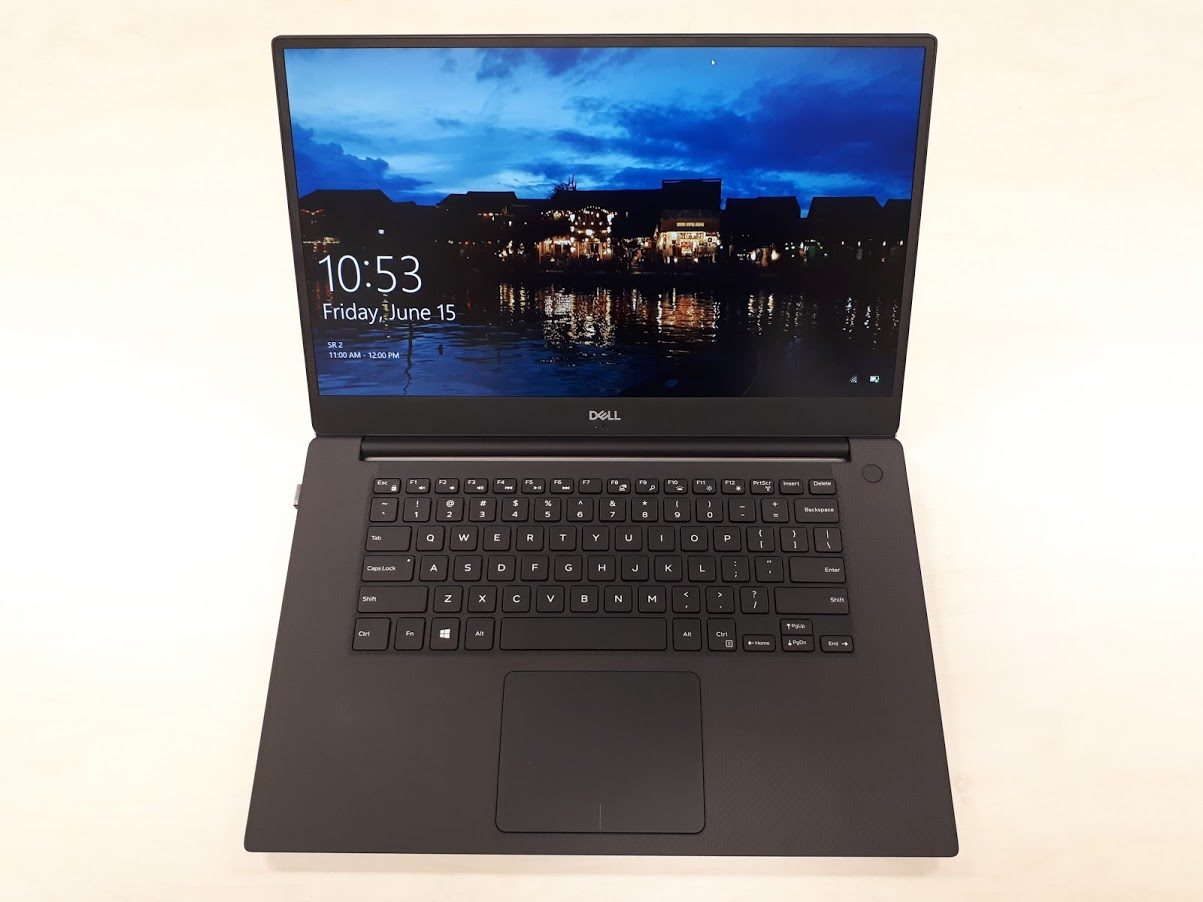
I originally reviewed the XPS 15 9570 (FHD) in June of this year, scoring it 4/5.
The Good
Let’s start with the good.
The 4K XPS 15 still has the best display I’ve seen on a laptop. The resolution, color accuracy, contrast, brightness, and evenness on my unit strike me every time I use it.
The CPU performance is still excellent (especially after an undervolt), posting numbers 15-20% higher than your average i7 or i9 15-inch 2018 MacBook Pro.
Battery life is generally quite good, hitting 8-9 hours on a full charge without worrying too much — in fact, I don’t believe I’ve ever run out of juice on a single day of work since I’ve had the notebook.
The TrackPad is very pleasant to use, and the keyboard is quite decent as well. It’s no ThinkPad, but I can type quite comfortably on it for long periods without feeling fatigue.
Lastly, port-wise, I appreciate having both Type-A, Type-C, and SD card ports, meaning I don’t need to bring adapters with me everywhere.
The “Meh”
About 3 weeks after getting my XPS 15, I noticed an occasional rattling noise coming from the left side of the computer. It was intermittent, only noticeable at lower RPMs and only when the GPU was active. After examining the fan, I diagnosed it as a bad bearing, called Dell, and 2 days later a tech came to swap the fan for a new one. No fuss, no muss, no downtime.
I would have been more annoyed had I not had the next business day premium warranty, however — something I have learned to never skimp on.
The Bad
Unfortunately, there are a host of issues that have popped up and remain unresolved for the XPS 15 9570. Some of them are specific to the 9570, while others have plagued the whole series for years.
The first of these is what is known as high DPC latency, and has been well-documented on the XPS 15 series for years. DPC stands for Deferred Procedure Call, and it is used to set the priority of different tasks for execution.
A high latency is a problem primarily when playing audio, especially in real-time, because it results in crackling and popping audio. As a DJ, this is job critical, but it’s also very disruptive to the average user who just wants to play media through the built-in speakers. Dell seems to be aware of the issue (caused by ACPI.sys), but there is no fix as of this moment. There are some workarounds, such as toggling Spatial Sound on and then off again, but nothing fixes the problem for good. This means that playing live audio from the XPS 15 is a no-go, precluding musicians, producers, or DJs from using it for professional purposes.
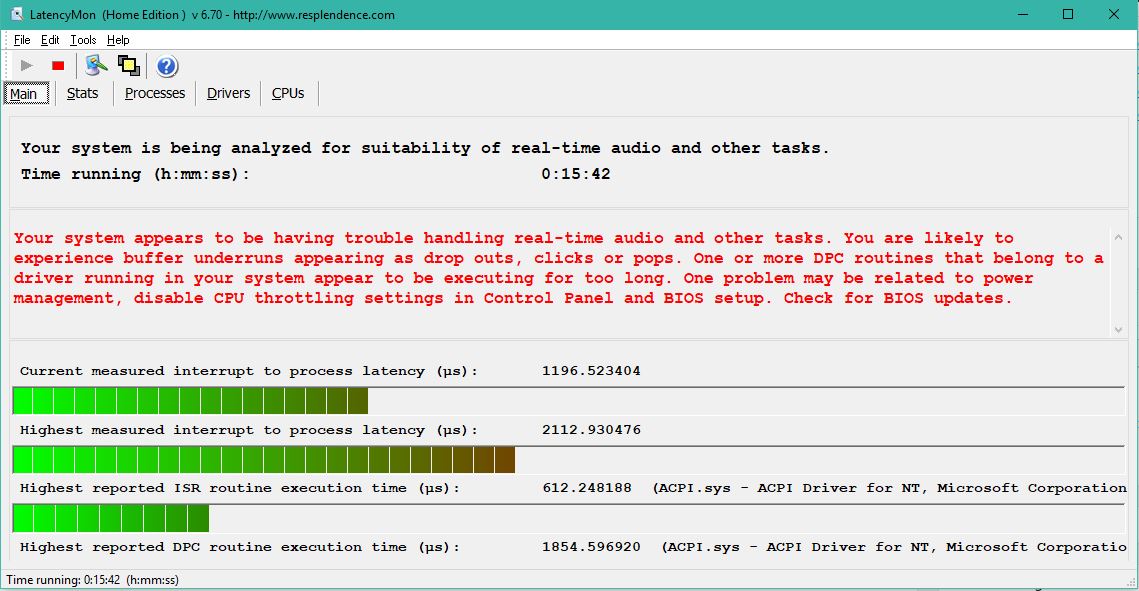
High latency on the XPS 15 9570 causing audio issues.
The second biggest issue I’ve noticed is the generally non-functional state of Modern Standby for this machine. Dell originally shipped the XPS 15 9570 with both traditional (S3) Standby and the newer phone-like Modern Standby. The first problem is that Modern Standby is broken: Every time I put the machine to sleep, I take it from its sleeve some time later to feel the chassis is quite warm, and upon waking it, I can see that I’ve lost somewhere between 2-10% per hour. Other times, the machine simply doesn’t wake up and needs to be hard-reset. I’ve tried to diagnose what might be causing this, first replacing the included Killer Wi-Fi with an Intel 9260 card and then running sleep diagnostics, but I’ve received no answers.
This is made worse by the fact that Dell removed regular (S3) Standby in BIOS update 1.3.1. As I noted in my original review, using “proper” Standby resulted in some bugs and glitches involving the screen and the CPU. Rather than fix these bugs in S3 Standby, Dell decided to remove the feature altogether, forcing everyone to use the completely broken Modern Standby. The current situation essentially forces anyone who needs to conserve their power throughout 1-2 days to hibernate their laptop every time they are not using it. Lenovo’s flawed X1 Carbon Gen 6 had similar issues with Modern Standby, and so returned the option for traditional Standby in a recent BIOS update. In comparison, Dell’s handling of the problem thus far is unacceptable.
Even worse, from BIOS 1.31 update onward (currently at 1.4.1), Dell quietly began throttling the GPU at only 74C rather than the 78C the machine previously was limited to. I will try to be fair and assume this is not out of malice and manipulation of early benchmark scores and instead guess that perhaps there was another reason for this change. However, there was nothing mentioned in the BIOS update notes about this and no reason for the change was given. Since the XPS 15 9570 is a thin and light notebook, the GPUs have always run quite close to their prioritize temperature of 78C. Cutting this temperature limit down to a very conservative 74C will significantly impact the performance of the GPU as a result.
Additionally, the 1.4.1 BIOS — which cannot be downgraded from — seems to have introduced yet another severe bug: the touchscreen stops functioning after the laptop is put to sleep. To get this functionality back, the laptop must be restarted.
A final annoyance is that the CPU seems to have issues with idle power consumption. Instead of idling at around 0.7 W as intended, the CPU is often found to be unable to enter a lower C-state for some reason. The result of this is the CPU idling at significantly higher levels of power consumption, between 2.8-4.0 W. This has a significant negative impact on both battery life and idle temperatures, as it increases the idle drain from what should normally be 6-7W to 12-14W total system-wide consumption. This can be temporarily fixed by putting the computer to sleep and waking it, but it will happen each time the laptop is restarted. I’m not sure if this is a Windows problem, Intel problem, or Dell problem, but at the end of the day it’s Dell’s product that I paid nearly US$2500 for, and the ball is in their court to make the product work as it should.
These last two issues in conjunction lead to an almost farcical reality: the XPS 15 9570 now must be put to sleep in order for the CPU to properly enter low power states, but doing so will break the functionality of the touchscreen.
Conclusion
I gave the XPS 15 9570 a score of 4/5 in my initial review, noting that despite its flaws, it’s still one of the best all-around notebooks money can buy. This is still somehow true, but these issues remaining with the machine nearly 6 months after launch cannot be ignored, and I would now rate the XPS 15 9570 more like a 3/5.
Dell can and should do better to iron out these issues, and I hope that we can see some progress in this area in the next few months. In the meantime, I will be giving the new ThinkPad X1 Extreme a shot, so keep an eye out for my review where I match the X1E up against the XPS 15.
Update: Our detailed review of the more recent Dell XPS 15 9510 is available here.










Matt
September 25, 2018 at 5:17 pm
I am in the market for this laptop and surface book 2 15". I am getting both for around same price, but surface book 2 is a open box with little base scratch. Which one would you recommend based on your experience?
Douglas Black
September 26, 2018 at 1:58 am
I cannot recommend any product as expensive as the SB2 that cannot be upgraded or repaired by the user. I would go for the xps.
AkashGG
September 25, 2018 at 7:33 pm
The problem of waking up from standby mode was also on my Dell 3470. So Dell has been sleeping on this since many years already…
What about about the absence of a numeric keypad? Or are you just one to use a laptop for 'work' that does not even need inputting numeric information?
Douglas Black
September 26, 2018 at 2:02 am
I'm not sure what to make of your tone here about numbers, tbh. As I generally write probably 1 number per 500 words, I much prefer a centered keyboard on a laptop. It's just painful to use an off-centered keyboard on my lap. If I need to enter a few hundred columns of data for some reason, I'll use one of my desktops.
JT Miller
September 25, 2018 at 8:48 pm
I always hope for these long term types of reviews and rarely see them – so thank you! I would be very interested in a six month update as well (although in my opinion not solving the high dpc latency and power state flakiness three months after release for a flagship product is pretty disappointing).
Rob
September 28, 2018 at 1:45 am
Great review,
One thing ai would add is how annoying the fans can be good low intensive talks especially in a quiet environment
The fan curve on the XPS 9570 needs fixing, many of the solutions Suggested too generic. Putting it on quiet doesn't work, disabling turbo boost doesn't work.
A quick way to test the issue is to press F12 on boot up, go to Dell Diagnostics – "ePSA Pre-boot System Assessment). From there look at the System health and you will see that temps never get past 49C, and the fans keep cycling from 0 – 2504 RPM. It does this every 20 secs or so. This eliminates any concerns about windows running something it shouldn't.
Dell engineers I urge you to go to a library with a Dell XPS 9570 laptop, plug it into the AC wall charger and just use it in a very quiet environment and be surprised at how often the fans kick in when you are doing absolutely nothing extraordinary
Tom
October 5, 2018 at 1:57 pm
The fans are a nightmare, constantly spinning up and down on my machine.
Add to that:
The power socket is loose and Dell tried to tell me this was wear and tear and I'd have to front for it to be repaired…
The headphone jack has some wonky interference when no audio is playing.
The machine wont go into standby on Ubuntu.
the track pad has a mind of its own a lot of the time and copy pastes all over the shop.
The price has dropped £400 since I bought it
I'm stuck with a very irritating and massively expensive computer…
Also the audio issue above means I'm going back to my old Mac to do music, which is a shame as I could do with the grunt for Komplete…
Pretty disappointed, should have fronted the extra £1000 and bought another mac are my general feelings…
E Marie
October 26, 2018 at 3:53 am
I actually just ended up returning my XPS 15 for the reasons you have listed. I wish I had found your review much sooner.
I had mine for 3 weeks and used it maybe 7 times. I went to turn it on one day, and it struggled a bit. I plugged the power cord in and it finally turned on. I assumed it was low battery, thought nothing of it. I worked for a bit, closed the lid and went for a nap. When I returned, I tried everything to turn it back on. The backlight on the keyboard would do a quick flash, but nothing would happen. After spending an hour trying various things, I called Dell. They told me it was a motherboard issue and would send someone to repair it.
Needless to say, I was extremely displeased. I thought rather than going through a repair process and not knowing if the same thing would happen again, I returned it before my 30 day window was up. I really did love it up until the crackling speakers and this.
Alvaro
October 28, 2018 at 3:57 am
I do not read anything but dislikes about this Dell in different forums.
I am thinking about acquiring a Precision 7530, which, despite having the same cooling problems as other thin laptops, will not be as much trouble as with the Dell XPS
Jiri
November 4, 2018 at 11:34 am
Hi Douglas, do you know if Precision 5530 suffers with these problems as well? Thanks
Douglas Black
November 4, 2018 at 11:36 am
almost certainly, though I have not owned one. The laptops are otherwise the same, excluding the wifi card — which I had already replaced in an attempt to try and make the XPS 15 more stable
John Guanumen
November 11, 2018 at 9:43 am
Hi Douglas
Excellent review. until now the issues remains? Any thermal throttling?
For performance laptop with gaming capabilities, do you still recommend that Lenovo X1E?
Douglas Black
November 11, 2018 at 10:23 am
I think the x1e is more reliable overall. Throttling temp of the GPU is not both 74 and 44c like in the xps, and the xps 15s constant issues with standby. I have little faith in Dell's support of the xps 15 overall.
Cagri
November 21, 2018 at 5:23 pm
thanks for the detailed and long-term review!
I have 2 questions:
1) What happened after bios 1.5 update, any improvements to solv some issues?
2) ignoring the price, should I go with xps or x1 extreme?
Thanks again!
Douglas Black
November 22, 2018 at 6:57 am
I no longer have the machine to test, but I hear there are two issues still: the GPU throttled BELOW a certain temperature (44C?) AND ABOVE 74C. That means the clocks will get locked down if it's not only too warm, but too cold. Absolutely absurd. The X1E will be the better buy, especially during Black Friday if you can get one from the US.
Nick
November 30, 2018 at 3:14 am
Is this the only remaining issue? Gpu throttling with temp ranges?
Should I cancel my order for a work laptop? Saw this after purchase, hasn't shipped.
Is the xps 13 better? What do I do lol
Larry Lockwood
December 11, 2018 at 5:44 am
I have been using the XPS 15 9570 for about 1 1/2 months now and it's been fantastic.
I am running into issues though where it seems to stall or hang up a bit, especially when switching folders or working in Outlook 2016. To be fair, I have a couple dozen windows open and Firefox using up 5 GB of RAM, but that's how I work.
Lenovo had 30% off ThinkPad's for Black Friday. I ordered a custom X1 Carbon Extreme with 32GB of RAM in one slot, leaving the second open for another 32 GB another day. 1 TB SSD, i7 – same as in the Dell.
I'm now growing attached to this Dell though and am not sure what to do.
I have until the end of January to return either, and look forward to trying out the ThinkPad.
What do you think? I read your review comparing them, but how do you really just feel, gut instinct?
Thank you!
Larry
Douglas Black
December 11, 2018 at 6:24 am
I think you are in a good position since you can try both. Give the x1e a week and see how you feel about the overall experience. Imo it's just a more refined machine, but it's all down to your feeling.
mahone
December 31, 2018 at 5:08 am
I got the matte 9570, does cleaning the screen with LCD cleaning products would wipe the antiglare off?
Rai Asaral
February 9, 2019 at 1:44 pm
I was thinking of getting this laptop next, thank goodness i stumbled to reddit and found the post there. Reading this review honestly saddens me. I really like the laptop, but these issues are things i cant just undermine.
Are these issue still occurring? Do you have any suggestion as an alternative to xps 15?
I was thinking of Asus Zenbook UX533. or do you have something for me?
Thank you! Great review!
Douglas Black
February 9, 2019 at 9:39 pm
The issues such as GPU throttling and no real sleep are still present, I'm afraid. For alternatives to the XPS, I would really only suggest the X1 Extreme at the moment. Hopefully you can find one in your country without being forced to pay an exorbitant price!
Rai Asaral
February 9, 2019 at 11:59 pm
Thank you so much for replying. I have read countless reviews in the past hours and this really gave me new things to think of before purchasing.
I don't like the look of the Thinkpads, it's too "professional" looking for me. Is there a release date for the 9580 yet? It might be worth it to wait. I need a laptop soon, but I want the best I can get since I will not be purchasing again in a few years.
Douglas Black
February 10, 2019 at 8:58 am
Hi Rai,
In my opinion there's nothing to be worried about looking "too" professional! But, if you are looking for the performance and upgradability and don't mind a bit less battery life and more weight, how about the Legion Y740? Good keyboard and build; better performance!
The 9580 might be worth the wait, but my experience with years of the XPS 15 says that it will be plagued with issues, many of which will not be fixed.
Henry
March 27, 2019 at 4:41 pm
My XPS 15 kept turning off during sleep when I undervolted using XTU. I'm using throttlestop now and it never turns off when on sleep (just need to turn throttlestop back on after booting from hibernation). I still get the audio crackling and wishing there was a fix for it.
Leslie
May 9, 2019 at 8:08 pm
You mentioned you replaced the wireless card. I am having connection issues when I log into my VPN server (connection lost frequently) and was wondering if it was the card although I have no trouble when surfing the net, etc… what kind of problems caused you to replace the card? Could the killer card be causing my VPN connection issue? Could it also cause problems with Outlook? I often have to shut down the program then restart iy yo get my email.
Douglas Black
May 11, 2019 at 10:08 am
I replaced it just out of my history with Dell's wireless cards — they are cheap enough, so I figured I might as well go and do it :)
I doubt the cart is having issues with your VPN, however… have you tried other VPNs and seen if the connection is more reliable?