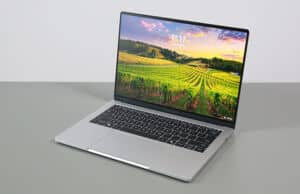
Time to review the Lenovo Yoga 9i 2-in-1 Aura Edition, in its latest 2026 gen11 refresh. For what it’s worth, this is sold as the Yoga 9i 2-in-1 in most markets, or as the Yoga 9 2-in-1 here in Europe.
We’ve tested most iterations of this Yoga 9i over the years, and seen it evolve into one of our favorite 2-in-1 convertible formats available in the premium segment.
That’s still the case for this 2026 generation, although this is a more serious refresh of the lineup, with a slightly revised chassis and improved ergonomics, updated inputs, and Intel Panther Lake hardware inside.
It’s a pity, however, that Lenovo only offers this with lower-tier Panther Lake Core Ultra Series 3 hardware, and not with the more powerful options. As a result, this is still a device meant for casual use and daily multitasking, but not for more serious mixed use and workloads. Furthermore, that also means this refresh isn’t more capable than the previous Lunar Lake iteration, which makes the bump in asking price difficult to justify, even if that’s standard across all Windows devices for this year.
Follow this link for updated prices and configurations on this Lenovo Yoga 9i 2-in-1 convertible , at the time you’re reading this article. Buying from our links earns us a small commission and helps support our work. Thank you!
You’ll find my detailed thoughts and impressions on this series further down in this review.
Spec Sheet – Lenovo Yoga 9i 2-in-1 Aura Edition, 2026 generation
Lenovo Yoga 9i 2-in-1 Aura Edition, 2026 model, gen 11
Screen 14 inch, OLED, 16:10 aspect ratio, touch, glossy,
Processor Intel Panther Lake Core Ultra Series 3,
Video Intel Graphics, 4 Xe Cores, up to 2.5 GHz
Memory 32 GB LPDDR5-7467 (soldered), up to 32 GB
Storage 1 TB M.2 NVMe SSD (Sandisk PC SN5100S) – single M.2 2242 slot
Connectivity Wireless 7 (Intel BE201) 2×2, Bluetooth 5.4
Ports left: 1x USB-C with Thunderbolt 4, HDMI 2.1, audio jack
Battery 70 Wh, 65W USB-C charger
Size 317 mm or 12.49” (w) x 223 mm or 8.76” (d) x 15.3 mm or .6” (h)
Weight 2.84 lbs (1.29 kg) + .33 (.72 lbs) for the USB-C charger and cables, EU version
Extras 2-in-1 convertible format with a 360-degree hinge, Yoga Pen 2 included,
Design, build quality This 2025 Yoga 9i is a refreshed chassis for 2026, although the differences are subtle and hard to spot at a quick glance.
This is still a premium unibody design entirely made out of aluminum, available in a Cosmin Blue color. In the past, Lenovo offered this in a few other color variants as well, but that’s no longer the case as of recently. Nonetheless, it’s beautiful and versatile color, which handles smudges and daily use well, but the painted metal surfaces can scratch over time, so better pamper it and keep it in a protective sleeve when traveling.
However, this newer Yoga 9i is a few mm larger than the previous model, especially in depth, and a few grams lighter. It weighs just shy of 1.3 kilos now, making it one of the lightest convertibles on the market.
Despite that, the chassis is as stiff and solid as it gets, without any flex in either the lid or the main deck. The hinge is smooth and strong as well, a crucial aspect for a 2-in-1 chassis. And as a particularity for this model, the hinge has been slightly redesigned: the exterior now better integrates with the laptop’s edges, while the interior acts as a soundbar, with a speaker grill finish and tweeters implemented inside. In the past, both sides of the hinge were designed as speaker grills.
Speaking of the edges, the main chassis part is still a little larger than the display part and its edges have this shinny finishing, while the edges around the display are a matte finish. This looks weird, and personally would have preferred a more unified approach with a matte finish all around, the kind Lenovo implement on their mid-tier Yoga 7i 2-in-1 models. We’ll have a separate article comparing the Yoga 7i and the Yoga 9i in due time.
This aside, this Yoga 9 remains a 2-in-1 format and thus can be used as a laptop, tablet or something in between. It still makes the most sense as a laptop, of course. If you want something that excels as a tablet, I’d recommend getting a device that’s primarily a tablet, such as Surface Pro.
Inside, those familiar with the 9i lineup might also notice another small update: the more minimalist keyboard, which we’ll discuss in a bit. There are no speaker grills flanking the keyboard, as the tweeters are placed in that hinge; thus, this is a more minimalist design.
As for the IO, that’s still lined around the edges, but slightly revised in order to include a full-size HDMI, a full USB-A and two USB-C with Thunderbolt 4, one on each side. Little else you could ask, even if there’s no card reader. And no camera kill-switch either, as on a few other Lenovo devices.
The power button is still placed on the right edge and you’ll want to disable it from the settings to prevent accidentally sending the laptop to sleep when transitioning between laptop/tablet modes.
Overall, this Yoga 9i 2-in-1 generation looks and feels much like the previous 9is of recent years, with a similar premium build and general feel, but it is a little lighter and more ergonomic with the updated IO and hinge design. One of the most versatile convertible designs out there.
Keyboard, touchpad The keyboard and touchpad have been slightly refreshed for this Yoga 9i 2-in-1 generation.
The keyboard, in particular, is a more minimalist layout that no longer includes a column of media keys at the very right. As far as I’m concerned, that’s a plus, as you no longer hit the wrong key when looking for Enter or Backspace. Plus, those media keys hardly offered any real functionality. At the same time, Lenovo didn’t put speaker grills on that extra space that flanks the keyboard now, and that’s fine as well, as you do get upfiring speakers in the hinge.
Layout aside, the finishing and general feedback of this keyboard hasn’t changed. The keys color match the laptop’s blue-gray color, feel rubbery to the touch, and don’t smudge easily.
The typing experience is alright, with good feedback and fairly quiet actuations. One of the better typers in the ultrabook space.
The keys are backlit, with white LEDs. Light still creeps up from underneath most keys with this design, but otherwise the LEDs are bright and uniform and do what they’re supposed to do.
The touchpad is a large glass matte surface and works well with touches, swipes, gestures, and clicks. However, the physical clicks have this annoying clunk, louder than in the past and louder than on any laptop I’ve used in recent years – not sure if that’s by design or a quirk of my unit. You get used to it, but those around you in your office/home/class might hate you for it.
This touchpad is large, yet the margin towards the laptop’s front edge has been increased with the overall deeper chassis on this generation. That means ghost touches from your clothes when using this on the lap are even less of a concern now.
As far as biometrics go, there’s IR support in the camera, but there’s no longer a fingerprint sensor (which was part of that extra column of keys on the previous generation).
14-inch OLED display, 120 Hz, touch Lenovo offers a single display option for this series, unlike in the past. That’s a standard glossy touch OLED with digitizer and pen support.
It’s a fairly modern OLED, at least, with 2.8K 2800 x 1800 px resolution, 30-120Hz refresh rate with VRR, 500 nits of sustained brightness, and 100% DCI-P3 color coverage. At the same time, this is the same OLED offered on the previous-gen Yoga 9i 2-in-1, so nothing has changed between generations on this end.
Here’s what we got in our tests, with an X-Rite i1 Display Pro sensor :
Panel HardwareID: LEN8AD6 (LEN140WQ+);
Coverage: 100% sRGB, 91.9% Adobe RGB, 99.2% DCI-P3;
Type: 10-bit with HDR400, VRR 30-120 Hz;
Measured gamma: 2.24;
Max brightness in the middle of the screen: 486.20 cd/m2 on power;
Min brightness in the middle of the screen: <10 cd/m2 on power;
Contrast at max brightness: 1:1;
White point: 6200 K;
Black on max brightness: 0 cd/m2;
PWM: Yes, to be discussed.
What’s interesting about this display is the fact that it doesn’t showcase the grain and screen door effect normally found on touch OLEDs. The content and text look clean, even on light/white backgrounds.
And this display still offers pen support, with an ergonomic pen included in the box. It charges via USB-C and has a rounder shape, unlike the flatter pen offered in the past. It still attaches magnetically to the back of the display, and the magnets are strong so it won’t fall off easily. Down below, I’ve added an image of this pen next to the previous-gen Yoga; the same pen is bundled with this refreshed model.
On the other hand, this is an OLED and suffers from flickering, and should be used carefully with static content and high brightness levels.
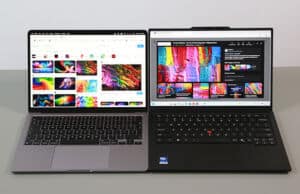
And then, this is a highly glossy and reflective finish, which means it’s hardly ideal for bright environments. For illustration, I’ve added an image of this glossy OLED (in the middle) next to the anti-glare OLEDs on the ThinkPad X1 Carbon (right) and the ExpertBook Ultra (left).
Hardware and performance Our test model is a mid-specced configuration of the 2026 Lenovo Yoga 9i 2-in-1 with an Intel Core Ultra 7 355 processor and Intel Graphics iGPU, 32 GB of LPDDR5x-7467 memory, and a fast 1TB gen4 SSD.
Disclaimer: This is a retail unit offered by Lenovo for review. It is tested with the software available as of early August 2026 (BIOS TCN25WW, Vantage 5.1.2607.5 app, Intel V32.0.101.8860 driver), a mature package at this point.
Spec-wise, this series is based on Intel’s Panther Lake hardware platform, with Core Ultra Series 3 processors.
However, Lenovo only offers a Core Ultra 7 355 configuration for this series, which is the entry-level Ultra 7 with 4 Performance Cores, 4 Low Power Efficiency Cores, and a total of 8 Threads. This is equivalent to the Lunar Lake 256V/258V processor found in previous Yoga 9i models. The hardware runs at up to 35W sustained on Performance mode in this laptop, a little higher than in the past.
Not offering Core Ultra H or X chips in this chassis is a failed opportunity. Those options would have made this Yoga 9i a far more competitive daily driver and multitasker.
Lenovo also went with slower RAM on this series, with support for LPDDR5x-7467 memory. Most configurations ship with 32 GB of RAM by default, but variants with 16 GB might also be available.
For graphics, the Panther Lake chip ships with Intel Graphics with 4x Execution Units and speeds of up to 2.5 GHz. On paper, that’s a notable downgrade from the Arc 140V iGPU in the previous gen, but in real life the higher clocks and the updated 3rd gen cores compensate, delivering decent graphics performance for a laptop of this sort. Nonetheless, a configuration with Arc B390 graphics with 12x EUs would have been far more capable.
For storage, our unit bundles a fast PCIe gen4 Sandisk PC SN5100S SSD, which is fine for most use cases. Just keep in mind that this chassis only supports compact M.2 2242 SSD formats, which can be somewhat limiting if you plan on updating the default drive with a higher-capacity model.
The SSD is the only upgradeable component inside the laptop. To get inside, you need to remove the back panel, held in place by four visible Torx screws of the same size, as well as three extra Philips screws hidden behind the laptop’s rear rubber foot. Overall, getting inside this laptop proved quite challenging, requiring some effort with the prying tool.
As far as the software goes, this Yoga gets the standard Lenovo Vantage app, which allows control over the power profiles, battery, and screen settings, updates, etc.
There are three performance/thermal profiles to choose from:
Performance – runs the hardware at ~28W with mixed use and ~35W in sustained CPU loads, with up to ~40 dBA max fan noise;
Auto (Intelligent Adaptive) – limits the hardware at ~22-28W sustained with up to ~35 dBA max fan noise;
Battery Saver – gradually limits the CPU at ~12W, with fan noise <30 dBA.
Pretty good profiles, although the Auto mode performs rather erratically between apps, without consistency in the imposed power limits.
Here’s what to expect in terms of speeds and temperatures with daily chores such as streaming video, editing text, or browsing the web.
Productivity Performance and Benchmarks On to more demanding loads, we start by testing the CPU’s performance in the Cinebench R15 loop test. We keep the laptop on a stand, raised off the desk, for consistency with other reviews.
On Performance, the hardware peaks at ~65W for a split second, and then stabilizes at 35W, with internal temperatures in the low-80s °C and fan noise of 40 dBA. The laptop scores around 1550 points.
On Auto, the system only limits power to around 30W or so, with fan noise of 35 dBA and internal temperatures in the mid-70s °C. The scores drop by only a few %.
Battery Saver mode keeps the fan noise quieter at sub- 30 dBA, and limits the hardware to around 15W sustained, with a more notable impact on the scores – about 60% of what the hardware scores on Performance.
Finally, our sample performed very well on battery, running at around 30W on Performance mode. That’s on par with the plugged-in Auto profile.
All these are illustrated in the graph below.
To put these in perspective, here’s how this Core Ultra 7 355 implementation fares against other hardware platforms available in current and past-generation thin and light laptops .
It’s only a tad faster than the Lunar Lake Core Ultra 256V tested in the previous Yoga 9i 2-in-1, and actually a little slower than the Core Ultra 155H platform implemented in the 2024 Yoga. At the same time, because the hardware runs at 35W in this test, internal CPU temperatures are higher on this generation compared to the Lunar Lake variant.
Furthermore, this hardware is roughly on par with the AMD Gorgon Point Ryzen AI 7 445 platform, albeit that chip is implemented in much more affordable devices. And then, on the other hand, Panther Lake Core Ultra 7 H or X7 with the 16C/16T processors, as well as the higher-tier AMD Strix/Gorgon options, are twice as fast in this sustained CPU load. Hence, the lost potential of not offering those configurations here, even as an extra option.
We then went ahead and further verified our findings with the more taxing Cinebench R23 loop test and in Blender. We measured similar behavior, power limits, fan noise, and temperatures.
We then ran the 3DMark CPU profile test.
Finally, we ran our combined CPU+GPU stress tests on this notebook, on the Performance profile. 3DMark stress runs the same test for 20 times in a loop and looks for performance variation and degradation over time. This unit passes the test on or off the desk, which means the performance is not impacted in longer-duration sustained loads as the heat builds up. More on that in the gaming section.
Benchmark results and performance summary With that out of the way, let’s get to some benchmarks. We ran our standard set of tests with the laptop on Best Performance mode (28-35W sustained TDP) and the screen set at its default 2.8K resolution.
Here’s what we got.
3DMark 13 –CPU profile: max – 6208, 16 – 5978, 8 – 6116, 4 – 3972, 2 – 2145, 1 – 1126;3DMark 13 – Fire Strike: 6595 (Graphics – 7378, Physics – 19707, Combined – 2361);3DMark 13 – Solar Bay: 12155.3DMark 13 – Steel Nomad Light: 2350.3DMark 13 – Time Spy: 3360 (Graphics – 3066, CPU – 7390);3DMark 13 – XeSS: XeSS Off – 6.48 fps, XeSS On – 18.50 fps, 185.7% performance difference.
Uniengine Superposition – 1080p Extreme: 1674;Uniengine Superposition – 1080p Medium: 4632;
Aida64 Extreme, memory test: 84136 MB/s read, 90587 MB/s write, – MHz latency;PCMark 10: 7380 (Essentials – 10131, Productivity – 11586, Digital Content Creation – 9295);GeekBench 6.6.0 64-bit: Multi-core: 11716, Single-Core: 2733;GeekBench AI 1.7.0 (ONNX, CPU): Single: 3553, Half: 1513, Quantized: 6879;CineBench R15 (best run): CPU 1681 cb, CPU Single Core 291 cb;CineBench R23: CPU 11150 pts (best run), CPU 10351 pts (10 min loop test), CPU Single Core 1990 pts (best run);CineBench 2024: CPU 615 (10 min run), CPU Single Core 118 pts;CineBench 2026: CPU multiple threads: 2505 (10 min run), CPU single thread: 484 pts.
And here are some work-related benchmarks, on the same Best Performance profile:
Blender 5.1.2 – BMW Car scene – CPU Compute: 3m 34s ;Blender 5.1.2 – Classroom scene – CPU Compute: 8m 39s;Blender 5.1.2 – Classroom scene – GPU Compute, OneAPI: 2m 10s;
SPECviewperf 2020 – 3DSMax 07: 19.29;SPECviewperf 2020 – Catia 06: 15.35;SPECviewperf 2020 – Creo 03: 26.82;SPECviewperf 2020 – Energy 03: 3.76;SPECviewperf 2020 – Maya 06: 79.26;SPECviewperf 2020 – Medical 03: 10.13;SPECviewperf 2020 – SNX 04: 6.47;SPECviewperf 2020 – Solidworks 07: 33.73;SPECviewperf 15 – 3DSMax 08: 10.60;SPECviewperf 15 – Blender 01: 9.16;SPECviewperf 15 – Catia 07: 5.53;SPECviewperf 15 – Creo 04: 16.99;SPECviewperf 15 – Energy 04: 3.31;SPECviewperf 15 – Enscape 01: 6.07;SPECviewperf 15 – Maya 07: 50.13;SPECviewperf 15 – Medical 04: 9.93;SPECviewperf 15 – Solidworks 08: 11.70;SPECviewperf 15 – Unreal Engine 01: 21.19;V-Ray Benchmark: CPU – 7330, CUDA – 198.
This isn’t a very fast platform, as expected given the specs. It’s fine for casual use and light to medium multitasking, but will eventually struggle with heavier loads. That doesn’t mean, however, you can’t use it for heavier tasks time and again, such as more demanding browsing and Office loads, editing some photos or a video, or running some casual games here and there.
On the CPU side, the Core Ultra 7 355 runs at a fairly high power here, and that allows it to perform better than most other similar implementations. Nonetheless, this is still an 8C/8T processor, and can only do so much. That means it’s about on par in sustained multi-threaded performance potential with 2024-level Lunar Lake Core Ultra 7 256V/258V platforms, with a slight 5% gain in IPC performance.
In all fairness, this exact Yoga 9i model outperforms the Ultra 7 256V in the previous-gen Yoga 9i by 5-10%, but that’s a measly gen-over-gen improvement.
At the same time, if Lenovo had offered Core Ultra 7 356H or Ultra X7 358H configurations here, those would have scored 50-100% faster in CPU sustained activities.
Now, in all fairness, the X7 might not have been an ideal implementation in this chassis, as it wouldn’t have run at its maximum iGPU potential at 28-30W, but the Ultra 7 356H would have been a good option to have. I’d expect Lenovo to consider that most people won’t get this lineup for serious loads, and thus went with the Ultra 7 355 specs. Furthermore, the short supply of higher-tier Panther Lake silicon might have also plaid a role in this decision, with Lenovo most likely prioritizing those chips for other devices where the demand and benefit would make more sense – like the ThinkPad X1 Carbon tested recently .
Back to our unit, on the GPU side, the Intel Graphics with 4x Xe cores scores only about 10-30% lower than the Arc 140V in the previous-gen Lunar Lake hardware, despite that one integrating an 8x Xe cores architecture. Nonetheless, Panther Lake comes with revised 3rd gen Xe cores and higher clock speeds, which compensate for the more limited number of graphics execution units.
Gaming Performance While this Yoga 9i 2-in-1 is not a gaming laptop by any means and only bundles a lower-tier Panther Lake iGPU, we still ran a couple of DX11, DX12, and Vulkan games on the Performance profile of this Core Ultra 7 355 + Intel Graphics configuration, at FHD+ resolution, with Low/Lowest graphics settings.
I threw in a few other platforms for comparison.
Low settings Yoga 9i 2-in-1 2026, Yoga 9i 2-in-1 2025, ThinkPad X1 Carbon 2026 ,ExpertBook Ultra 2026 ,Zenbook S14 2026 ,
Cyberpunk 2077 26 fps (18 fps – 1% low)
–
25 fps (16 fps – 1% low)
54 fps (36 fps – 1% low)
24 fps (12 fps – 1% low)
Cyberpunk 2077 60 fps (25 fps – 1% low)
–
58 fps (24 fps – 1% low)
112 fps (40 fps – 1% low)
56 fps (26 fps – 1% low)
Far Cry 6 43 fps (32 fps – 1% low)
50 fps (36 fps – 1% low)
46 fps (36 fps – 1% low)
90 fps (70 fps – 1% low)
46 fps (38 fps – 1% low)
Horizon Forbidden West 38 fps (32 fps – 1% low)
47 fps (36 fps – 1% low)
46 fps (36 fps – 1% low)
72 fps (56 fps – 1% low)
45 fps (36 fps – 1% low)
Shadow of Tomb Raider 58 fps (48 fps – 1% low)
65 fps (36 fps – 1% low)
67 fps (54 fps – 1% low)
103 fps (58 fps – 1% low)
62 fps (45 fps – 1% low)
The Witcher 3: Wild Hunt 80 fps (60 fps – 1% low)
74 fps (58 fps – 1% low)
80 fps (62 fps – 1% low)
110 fps (75 fps – 1% low)
74 fps (50 fps – 1% low)
Cyberpunk, Horizon, Witcher 3 – recorded with MSI Afterburner in-game mode;
Far Cry, Tomb Raider – recorded with the included Benchmark utilities.
These results are close to the previous-gen model with the Lunar Lake specs, and close to the graphics capabilities of the Ultra 7 356H implementation, since that comes with the same kind of Intel Graphics iGPU.
All in all, you’re getting decent framerates even with more demanding titles, especially where XeSS is supported and properly implemented.
With that out of the way, let’s go through some CPU/GPU logs.
The hardware runs at about 28W sustained TDP on Performance mode, which is plenty for full graphics performance. The fans spin at up to 40 dBA at head level, which translates in internal temperatures in the mid-60s to low-70s °C, with the laptop raised off the desk. Keeping this flat on the desk leads to minimally higher internal temperatures.
Overall, this Panther Lake generation runs a little warmer than the previous-gen Lunar Lake hardware at similar power.
Adaptive mode allows for quieter fans, at around 35 dBA, with the hardware settling at 22-25W sustained. The GPU still works fine at this level, with a 10% or so drop in framerates compared to Performance mode.
Internal temperatures don’t change in a significant way, and we still measured them in the mid-60s to low-70s °C.
Finally, Battery Saver mode aggressively limits the CPU’s power to only around 12-13W, which causes a 50% drop in performance. Of course, with lower temperatures and quieter fans, but this is not a mode I’d use for gaming or any other sort of demanding chore.
Noise, Heat, Connectivity, speakers, and others The cooling module on this refreshed Lenovo Yoga 9i 2-in-1 is slightly different from that of the previous generation.
It’s still a dual-fan, dual-heatsink, dual-heatpipe design, but the heatpipes are actually smaller, and they’ve put a thermal shield on top of the CPU; that’s perhaps in an effort to contain heat and prevent it from spreading onto the metal underside.
For comparison, here’s the cooling on the previous-gen Yoga 9i 2-in-1 chassis.
Overall, this cooling module handles the hardware well, with CPU-level temperatures in the mid-60s °C to low-70s °C in mixed use, and around 80s °C in sustained CPU loads, where the system allows the hardware to run at higher power. However, these temperatures are 5-8 °C higher than on the previous-gen Lunar Lake Yoga 9i model.
As far as the noise levels go, expect up to 40 dBA on Performance, 35 dBA on Auto, and sub-30 dBA on Battery Saver mode.
With daily use, the fans keep mostly idle on all profiles, including on Performance with the laptop plugged in. They kick in with heavier multitasking, but you’ll still rarely notice them unless you’re using the laptop in a perfectly quiet environment. I haven’t noticed coil whine or electronic noises on this unit, either.
As for external temperatures, the chassis keeps cool with light use, with the warmest spots in the middle of the keyboard just around 30 °C.
*Daily Use – streaming Netflix in EDGE for 30 minutes, Best Battery Mode, fans at 0 dB
With demanding loads, the hotspot further develops in the middle of the chassis around the CPU area, but doesn’t jump over 40 °C at keyboard level or over 45 °C on the back; the areas that you’ll mostly come in contact with stay in the low to mid-30s °C.
Overall, these temperatures are slightly lower than what we measured on the previous Yoga 9i chassis, and make this device one of the most thermally comfortable ultrabooks to use with heavier tasks. One more reason to be bitter about the choice in CPUs that Lenovo went with, not offering higher-tier Panther Lake Core H and X chips.
*Gaming – Performance mode – playing Cyberpunk for 30 minutes, fans at ~40 dB
For connectivity, there’s the latest-gen Wi-Fi 7 and Bluetooth 5.4 through an Intel BE201 module on this laptop. Evering performed fine in my time with this laptop.
Audio is still handled by a set of four speakers, two main ones that fire on the bottom, and two extra tweeters integrated in the screen’s hinge. These make the Yoga 9i 2-in-1 one of the better-sounding ultraportables out there, with loud volumes and pretty good quality, even if the lows are still not great. Overall, the audio quality doesn’t seem to have changed in any notable way between generations, even with the slight design changes on this refresh: different soundbar hinge and no punched speaker holes on the edges anymore.
Finally, there’s a 5MPx camera placed at the top of the screen, flanked by microphones. The image quality is fine in good light, and the camera gets a pretty wide angle. The camera comes with a physical cover, not with a kill switch as on other Lenovo laptops.
There’s also IR functionality with Windows Hello support.
Battery life – solid runtimes There’s a 70 Wh battery inside this Lenovo Yoga 9i 2-in-1, a fair size for a 14-inch lightweight chassis, but smaller than the 75 Wh battery in the previous 9i generations.
Here’s what we got in our battery life tests, with the screen’s brightness set at around 120 nits (~60% brightness) and at a 120Hz refresh rate (the system doesn’t automatically switch to 60 Hz, but you can do it manually if you want to). I’ve also set the Windows 11 power mode to Best Power Efficiency.
8-10 W (~7-8 h of use) – text editing in Google Drive, Battery Saver Mode, screen at 60%, Wi-Fi ON;6 W (~12-14 h of use) – 1080p fullscreen video on Youtube in Edge, Battery Saver Mode, screen at 60%, Wi-Fi ON;6 W (~12-14 h of use) – Netflix fullscreen in Edge, Battery Saver Mode, screen at 60%, Wi-Fi ON;8-12 W (~6-8 h of use) – browsing in Edge, Battery Saver Mode, screen at 60%, Wi-Fi ON;45 W (<2 h of use) – Gaming – Cyberpunk, Auto Mode, screen at 60%, Wi-Fi ON.
Fair runtimes with general multitasking, and a little heavier on battery drain with video streaming compared to other Panther Lake notebooks we’ve tested.
For comparison, here are the battery results on the previous-gen Lunar Lake Yoga 9i 2-in-1 model.
<3 W (20+ h of use) – idle, Battery Saver Mode, screen at 50%, Wi-Fi ON;7-10 W (~7-10 h of use) – text editing in Google Drive, Battery Saver Mode, screen at 50%, Wi-Fi ON;<4 W (15+ h of use) – 1080p fullscreen video on Youtube in Edge, Battery Saver Mode, screen at 50%, Wi-Fi ON;<4.5 W (15+ h of use) – Netflix fullscreen in Edge, Battery Saver Mode, screen at 50%, Wi-Fi ON;10-15 W (~5-8 h of use) – browsing in Edge, Auto Mode, screen at 50%, Wi-Fi ON;40 W (<2 h of use) – Gaming – Dota 2, Auto Mode, screen at 50%, Wi-Fi ON.
About the same, but more efficient with video content. This could be perhaps fixed with software updates later on.
Over here in Europe, this Yoga no longer comes with a charger bundled in, which is a highly stupid decision due to local legislation. In other markets, you’ll get a 65W Lenovo USB-C charger included, with a mid-sized brick and two long cables. For ilustration, I’ve included an image of the 65W charger bundled with the previous 9i generation – I don’t think this has changed in any way for the refreshed variant.
Much like in the past, I would argue Lenovo should offer a more modern single-cable charger design with this premium lineup.
Price and availability At the time of this article, the Lenovo Yoga 9i 2-in-1 Aura Edition is widely available everywhere.
Follow this link for updated prices and configurations in your area .
The 2026 refresh is mostly offered in a single variant, with the Core Ultra 7 355 processor, 32 GB of RAM, and 1 TB of SSD storage, alongside the 2.8K OLED touch display. This retails at $2299 in the US, between 2000 to 2500 EUR here in Europe, and 1999 GBP in the UK.
That’s about 400-500 USD/EUR/GBP more than the previous gen 9i 2-in-1 back when we reviewed it, and I’d reckon we should see some further discounts in the second part of the year.
Last year’s Lunar Lake 256V/258V configurations are no longer directly sold by Lenovo, but there’s a chance you might still find them here and there on 3rd party shops, and with potentially more competitive prices. I’d primarily look for one of those if still available where you are.
Follow this link for updated prices and configurations in your area , at the time you’re reading this article.
Final thoughts- 2026 Lenovo Yoga 9i 2-in-1 (Aura Edition) review With HP no longer renewing their OmniBook Ultra Flip series anymore, the Lenovo Yoga 9i 2-in-1 remains pretty much a sole contender in its space of lightweight premium convertible notebooks.
The ThinkPad X1 2-in-1 Aura Edition and the EliteBook X Flip are potential alternatives, albeit at a higher price; those are offered in a multitude of other specs, though, including a matte OLED and faster Panther Lake hardware. The Surface Pro is another alternative, especially if interested in a lightweight daily-driver in a more compact chassis, and the Yoga 7i 2-in-1 or the HP OmniBook X1 Flip are potential options to look into as well, but those are mid-level designs and not quite as refined as the 9i series. They do sell for a fair bit less, though.
But as a premium laptop-first format with a 360-degree display, the Yoga 9i 2-in-1 is hard to beat. And the slight adjustments of this refreshed design add up to its practicality and versatility.
At the same time, given the price increase for 2026 notebooks, I still think the previous Lake generation is worth more than a look, especially considering the Core Ultra 7 Panther Lake specs in this refreshed model offer similar capabilities and efficiency on battery power. If you can still find those in stock where you are.
All in all, this Lenovo Yoga 9i 2-in-1 Aura Edition remains a functional daily-driver portable laptop with a 360-degree display, and arguably the best of its kind. That sums up my time with it, but I’m looking for your thoughts and impressions down below in the comments section.
Disclaimer: Our content is reader-supported. If you buy through some of the links on our site, we may earn a commission.
Terms .
Navigation: Ultrabookreview.com » Lenovo
Review by: Andrei Girbea
Andrei Girbea is a Writer and Editor-in-Chief here at Ultrabookreview.com . I write about mobile technology, laptops and computers in general. I've been doing it for more than 15 years now. I'm a techie with a Bachelor's in Computer Engineering. I mostly write reviews and thorough guides here on the site, with some occasional columns and first-impression articles.