This is my detailed review of the 2026 refresh of the Asus Zenbook A14 series.
The 2026 Zenbook A14 model year is a hardware refresh of the same 14-inch chassis launched last year, and already discussed in this previous review article . It’s now powered by significantly more capable Qualcomm Snapdragon X2 Elite hardware, while mostly everything else hasn’t changed between generations.
Thus, if you need a more powerful lightweight notebook around 1 kilo that’s, at the same time, one of the quietest and most efficient running on battery power among what you can find in the Windows camp today, this Zenbook A14 is an option worth considering. At the same time, though, this 2026 generation demands a significant premium over the existing 2025 models, which means those interested in a daily driver for more casual use would get better value with the previous iterations.
We’ll go over all my thoughts and impressions on this Zenbook A14 UX3407 series down below.
Follow this link for updated prices and configurations in your area .
Specs Sheet – Asus Zenbook A14 UX3407
Asus Zenbook A14 OLED UX3407OA, 2026
Screen 14-inch, OLED, 16:10 aspect ratio,
Processor Qualcomm Snapdragon X2 Elite X2E-88-100,
Video Qualcomm Adreno X2-90 GPU, 1.7 GHz
Memory 32 GB LPDDR5x-9523 (soldered), 152 GB/s bandwidth
Storage 1 TB SSD (Micron 2600), single M.2 2280 gen4 slot
Connectivity WiFi 7 (Qualcomm FastConnect 7800), Bluetooth 5.4
Ports left: 2x USB-C connectors with USB 4, 1x HDMI 2.1, mic/headphone
Battery 70 Wh, 100W USB-C charger
Size 311 mm or 12.22” (w) x 213 mm or 8.45” (d) x from 13.4 mm or 0.52” (h)
Weight 2.17 lbs (.98 kg) + .4 (.88 lbs) for the USB-C charger, cables
Extras clamshell format with a 150-degree hinge,
There are no lower-specced configurations offered for the 2026 Zenbook A14 series at this point, but I’d reckon that could change later in the year.
Design, build quality – lightweight chassis This Zenbook A14 is a compact 14-inch chassis, about the same size as the other 14-inch Zenbook variants, but notably lighter at just under 1 kilo. In fact, its light weight is one of this series’ main selling points when compared to the competitors in this space.
However, keep in mind that Asus actually offers two variants of this laptop: one that comes without a glass cover on top of the display and weighs 1 kg (2.2 lbs), and another that gets the glass over the panel and weighs closer to 1.1 kg (2.4 lbs). Both are non-touch, but there’s a difference in potential panel protection and glossiness for the glass-covered variant.
Screens aside, to make this laptop as light as it is, Asus crafted the entire case and chassis from a material branded as Ceraluminum, which is an aluminium alloy with a ceramic coating that feels like smooth stone to the touch. Besides being lightweight, this material is also scratch-resistant, and does an excellent job fending off smudges and finger oils.
That’s especially true for the lighter color option called Zabriskie Beige, illustrated below.
Asus offers an Iceland Gray color as well, but that’s not quite as widely available in stores as the Beige, at least for now.
If I were to be able to choose, I would probably favour the Gray. I just find it more up to my preference. But both are fine-looking colors.
Now, there’s one thing I would like to get clear: the overall feel of this Ceraluminum finish isn’t quite as premium as of the aluminiums used on something like a MacBook, XPS, or a Zenbook S laptop. In comparison, this A14 doesn’t feel cheap; it just feels different. But the weight and sturdiness should compensate for the difference in finishing.
At the same time, the entire laptop is built and finished with attention to detail, with a strong main deck, carefully polished edges and corners, and all the parts joining smoothly together. I noticed some flex in the main lid, though, so you’d better put this in a sleeve when having it in your backpack (there’s one included).
Ergonomics are mostly fine, but not perfect. The rubber feet offer decent grip on a flat surface, there are no annoying lights and LEDs in the line of sight, and the laptop’s design is minimalist and clean. At the same time, while the hinge allows easy one-handed adjustments, I wish it were a little stronger, and that it would lean back past 150 degrees.
The IO is lined on the edges, mostly on the left. That means both USB-C ports are over there, so you can only charge the laptop on that side. Furthermore, unlike the 16-inch Zenbook A16, this smaller 14-inch variant doesn’t offer an SD card reader.
All in all, this is a fair 14-inch design. The finishing and the lightweight are the main differentiators of this series in its segment. I just wish Asus had handled the IO and screen angle better.
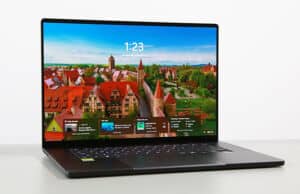
Before we jump to the next section, here’s how the 14-inch A14 compares to the larger 16-inch A16.
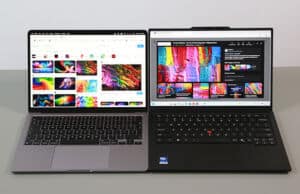
And here it is next to the Apple Macbook Air 13, which is one of its main competitors.
Keyboard, touchpad The Zenbook A14 and the A16 share the same keyboard, with a traditional 14-inch Asus layout we’ve seen on multiple Zenbooks over the last few years.
The keycaps feel a little different, though, with a finish that’s not as smooth or rubbery as on the standard Zenbook 14 keyboard (which is one of my favorite ultrabook keyboards).
Furthermore, this implementation offers 1.3 mm of stroke depth, thus a little less than on the standard Zenbooks, but still better than on the Zenbook S14 or a MacBook Air, which are shallower at around 1 mm.
All in all, this is a fine typer. The feedback from the keys is a little different that on the older Zenbooks, but at the same time, these keys are quieter and don’t show smudges at all.
The keys are backlit, with three brightness levels to choose from. The lowest setting is dim enough for proper use in dim environments at night, while the other two get quite bright.
Even the contrast on these beige keys is pretty good when using the notebook with the lights off, as the keys are a slightly darker beige nuance. The contrast is better on the Gray variant, though.
The touchpad is a large glass clickpad that spreads from just under the Space key to the front of the laptop – at least there’s a little space at the front. Nonetheless, occasional ghost swipes and fake touches from your palm and clothes can happen in certain situations. Personally, I prefer the practicality of slightly smaller touchpads.
Just like on the A16, this touhcpad integrates some smart gestures that allow adjusting the screen’s brightness or audio volume, among others. They work, but they’re redundant to existing keyboard functions.
As for biometrics, there’s IR support for the camera, and no finger sensor.
Display – 2K non-touch OLED The screen on this Zenbook A14 is a 2K non-touch OLED panel with 60 Hz refresh rate – the specs sheet on Asus’s website mentions the 3K 120Hz OLED option as well, but that’s not offered in retail configurations (haven’t seen it on any of the 2025 variants either).
There’s no touch variant offered, which is fine for me. I prefer non-touch OLED implementations without the grain effect noticeable on light backgrounds on touch OLEDs.
Now, this 2K OLED panel is fine for general use, with proper blacks, deep contrast, and beautiful colors at 100% DCI-P3 color coverage.
However, at up to 400-nits max, it doesn’t get as bright as the newer-gen OLED offered on the Zenbook A16, and the 2K 1920 x 1200 px resolution isn’t that sharp for this day and age. On top of these, this is a 60Hz panel, and that makes the experience feel a little sluggish if you’re used to higher-refresh displays.
And then this is a glossy finish, highly reflective in bright environments. What I have here is the variant without the extra layer of glass on top of the OLED panel, and it looks to me glossier than the display on my MacBook Air. Something to keep in mind if you plan on using your laptop in bright-light environments or outdoors. The variant with a glass cover might feel different, but I haven’t tested it – that’s exclusive to Best Buy in the US and hardly offered over here in Europe.
Hardware and performance – Qualcomm Snapdragon X2 Elite Our test model is a highly-specced version of the 2026 Asus Zenbook A14 OLED, code name UX3604OA, with a Qualcomm Snapdragon X2 Elite X1E-88-100 processor and Adreno integrated graphics, 32 GB of LPDDR5x-9600 memory, and a fast 1TB gen4 SSD.
Disclaimer: This is a review unit provided by Asus. I tested it with the software available as of late-April 2026 (BIOS 310, MyAsus 4.3.2.0 app). This is still launch-day software, thus some aspects could change with later updates.
Spec-wise, this series is based on the Qualcomm Snapdragon X2 Elite hardware platform, with the mainstream X2 Elite X2E-88-100 processor on this configuration. No other CPU options are offered at this point.
This platform is a SOC hybrid design with 18 CPU Cores and an Adreno X2-90 GPU. On the CPU side, we’re looking at 6x Performance Cores and 12x Prime Cores (Efficiency Cores).
The Qualcomm Hexagon NPU is mostly shared between all X2 Elite platforms as well, rated at 80-85 TOPS.
Graphics are handled by the integrated Adreno X2-90 chip running at up to 1.7 GHz on this X2 Elite chip.
Our configuration includes 32GB of LPDDR5x-9600 on-chip memory, with 152 GB/s bandwidth. Variants with 16/24 GB are available as well.
Finally, the platform supports gen4 storage, with a pretty fast Micron SSD on this A14. There’s no support for gen5 storage.
The SSD is the only upgradeable component here. To get inside, you need to remove the back panel, held in place by a couple of Torx screws. These screws are of two different sizes, so make sure you put them back in the right order.
Inside, you’ll find the motherboard with the thermal module, the battery, speakers, and the SSD. Everything is packed up tightly.
As far as the software goes, this Zenbook gets the standard MyAsus app, which allows control over the power profiles, battery, and screen settings, updates, etc.
There are three performance/thermal profiles to choose from (these power numbers are my estimates; take them with a lump of salt):
Performance – ~30W sustained, with fan noise ~42 dBA;
Standard – limits the hardware at ~20W sustained, with fan noise at up to ~35 dBA;
Whisper – limits the CPU at ~10-15W to favor fan noise of sub 30 dBA.
All these profiles are well optimized, with the fans mostly keeping idle with casual use and regular multitasking, even on Performance mode with the laptop plugged in. That’s unlike most other Asus laptops, where the fans are quite noticeable on Performance mode.
Before we jump to discussing the performance of this notebook, here’s what to expect in terms of speeds and temperatures with daily chores such as streaming video, editing text, or browsing the web.
Productivity Performance and Benchmarks Cinebench R15 is not properly optimized for Snapdragon hardware, and thus, the Cinebench R15 loop test that we’re usually running for testing sustained CPU performance is not relevant here.
Nonetheless, what’s important is that the power levels are easily sustained in this chassis, with comfortable thermal limits and no variation in performance and scores in CPU-heavy loads:
Performance mode – ~25W sustained, ~70 C on the CPU with the laptop raised off the desk, 45 dBa fan noise;
Standard mode – ~20W, ~65 C on the CPU with the laptop raised off the desk, 35 dBa fan noise;
Whisper mode – 15W, ~65 C on the CPU with the laptop raised off the desk, <30 dBa fan noise;
We also ran the 3DMark CPU profile test.
Finally, we ran our combined CPU+GPU stress tests on this notebook, on the Performance profile. 3DMark stress runs the same test for 20 times in a loop and looks for performance variation and degradation over time. This unit passed the test with the laptop flat or raised off the desk, which means the performance is not impacted in longer-duration sustained loads as the heat builds up.
Benchmarks results and performance summary With that out of the way, let’s get to some benchmarks. We ran our standard set of tests with the laptop on Performance mode (~25W sustained TDP) and the screen set at its default 2K resolution.
Here’s what we got.
3DMark 13 –CPU profile: max – 9270, 16 – 8677, 8 – 5351, 4 – 2898, 2 – 1635, 1 – 851;3DMark 13 – Fire Strike: 9632 (Graphics – 10079, Physics – 25526, Combined – 4251);3DMark 13 – Solar Bay: 22665, 86.18 fps;3DMark 13 – Steel Nomad Light: 4820, 35.71 fps;3DMark 13 – Time Spy: 4077 (Graphics – 3650, CPU – 12152).
Aida64 Extreme, memory test: 123185 MB/s read, 54177 MB/s write, 7.0 ns latency;PCMark 10: -;GeekBench 6.6.0: Multi-core: 20192, Single-Core: 3660;GeekBench AI 1.7.0 (ONNX, CPU): Single: 2070, Multi: 3704, Quantized: 7518;CineBench R15 (best run): CPU 3056 cb, CPU Single Core 280 cb;CineBench 2024 ARM: CPU 1428 (10 min run), CPU Single Core 151 pts;CineBench 2026 ARM: CPU multiple threads: 5931 (10 min run), CPU single thread: 642 pts.
And here are some work-related benchmarks, on the same Performance profile:
Blender 5.1.0 – BMW Car scene – CPU Compute: 1m 30s ;Blender 5.1.0 – Classroom scene – CPU Compute: 3m 33s;
V-Ray Benchmark: CPU – 12374, CUDA – 327;Puget Benchmark (v. 1.0.6) – Adobe Photoshop (27.3 – later crashed) – 10322;Puget Benchmark (v. 2.0.0) – Davinci Resolve (20.3) – 35305;
Just to make things clear, some of our standard benchmarks do not work properly on ARM hardware (older Cinebench, SPECviewperf, Uniengine Superposition), and even the Puget Benchmarks struggled here, with the latest iterations crashing.
This is a lower-power implementation of the Snapdragon X2 Elite hardware than on the 16-inch Zenbook A16. It’s also a slightly lower-clocked platform, but the main differences in test results come from the different power package: ~25-30W sustained here, compared to around 45W sustained on the A16.
As a result, this X2 Elite X2E-88-100 configuration matches the higher-powered XE2-94-100 in single-core CPU performance, but trails it by 15-25% in multithreaded tests. Even so, this X2 Elite is still notably faster in multi-threaded tests than a Panther Lake Core Ultra X7 358H at 45W, for example. And faster than an AMD Ryzen AI 9 as well. Thus, on the CPU side, this mid-powered X2 Elite is still one of the fastest platforms available today.
On the GPU side, while this platform integrates the same Adreno X2-90 iGPU seen on the XE2-94-100, it runs here at lower speeds and power, and thus scores about 10% lower in our tests. The Intel Arc B390 offered with some Panther Lake platforms still holds a 10-20% advantage in graphics tests, in comparison.
All in all, though, this X2 Elite X2E-88-100 platform is darn capable across the board and a major performance update compared to last year’s X1 Elite and X1 Plus implementations. We’re looking at 30-50% higher CPU single-core and multi-core performance, and 2x+ improvements in GPU capabilities.
However, these gains are mostly noticeable in sustained demanding loads, and less so with regular multitasking and use. And then, when it comes to sustained loads, you’ll still have to make sure that the software that you’re using works properly on ARM hardware. Standard stuff, such as browsers, Teams, Office, Adobe software, Blender, Davinci, and the like, these work natively on ARM, but there are still many applications that only work through emulation or might not work at all.
Standard mode, quieter at sub 35 dBA The laptop runs noisily in Performance mode, at 45 dBA. Standard mode keeps the fan much quieter at 35 dBA even when running sustained loads.
Here are some benchmark results for this Standard mode:
3DMark 13 –CPU profile: max – 7169, 16 – 7003, 8 – 4888, 4 – 2755, 2 – 1565, 1 – 850;3DMark 13 – Fire Strike: 8542 (Graphics – 9040, Physics – 21676, Combined – 3680);3DMark 13 – Steel Nomad Light: 4638, 34.36 fps;3DMark 13 – Time Spy: 3912 (Graphics – 3515, CPU – 10875).
GeekBench 6.6.0: Multi-core: 19706, Single-Core: 3531;CineBench 2026 ARM: CPU multiple threads: 5014 (10 min run), CPU single thread: 613 pts.
Blender 5.1.0 – Classroom scene – CPU Compute: 4m 14s;
The CPU scores are about 80% of Performance mode, while the GPU scores are about 85-95%.
Standard mode is where this laptop excels.
Gaming Performance We also ran a couple of DX11, DX12, and Vulkan games on the Full Speed and Performance profiles of this X2 Extreme with Adreno X2-90 graphics configuration, at FHD+ resolution, with Low/Lowest graphics settings. I threw in a few other platforms for comparison.
Low settings Zenbook A14 2026, Zenbook A16 2026, ExpertBook Ultra 2026, Zenbook S14 2026, Zenbook 14 2025, Zenbook S14 2024, Zenbook S 16 2024,
Black Myth: Wukong 23 fps (15 fps – 1% low)
25 fps (18 fps – 1% low)
–
–
–
–
–
Cyberpunk 2077 44 fps (37 fps – 1% low)
55 fps (44 fps – 1% low)
54 fps (36 fps – 1% low)
24 fps (12 fps – 1% low)
–
–
–
Cyberpunk 2077 –
–
112 fps (40 fps – 1% low)
56 fps (26 fps – 1% low)
–
–
–
Far Cry 6 66 fps (44 fps – 1% low)
74 fps (52 fps – 1% low)
90 fps (70 fps – 1% low)
46 fps (38 fps – 1% low)
52 fps (36 fps – 1% low)
52 fps (38 fps – 1% low)
54 fps (46 fps – 1% low)
Horizon Forbidden West **25 fps (20 fps – 1% low)
**26 fps (22 fps – 1% low)
72 fps (56 fps – 1% low)
48 fps (40 fps – 1% low)
44 fps (30 fps – 1% low)
45 fps (32 fps – 1% low)
40 fps (30 fps – 1% low)
Shadow of Tomb Raider **-
**-
62 fps (45 fps – 1% low)
72 fps (48 fps – 1% low)
66 fps (26 fps – 1% low)
72 fps (56 fps – 1% low)
The Witcher 3: Wild Hunt 98 fps (72 fps – 1% low)
122 fps (100 fps – 1% low)
110 fps (75 fps – 1% low)
74 fps (50 fps – 1% low)
66 fps (54 fps – 1% low)
78 fps (56 fps – 1% low)
60 fps (38 fps – 1% low)
Doom, Dota 2, Witcher 3 – recorded with MSI Afterburner in game mode;
Tomb Raider – recorded with the included Benchmark utilities.
**Shadow of Tomb Raider and Horizon FW throw an error that mentions no graphics card was detected. As a result, Horizon FW performs poorly, and Shadow of Tomb Raider crashes.
The results are all over the place, with some games running well, and others running poorly or crashing. That’s especially going to be the case with older titles, and older software in general.
Furthermore, the Qualcomm platform lacks frame generation technology to enhance framerates in games, in the way XeSS does on Intel platforms, and even FSR on AMD hardware to a lesser extent.
Compared to the graphics performance of the X2E-94-100 implemented in the Zenbook A16, this X2E-88-100 generally offers ~20% lower framerates. But that’s mostly because the hardware runs at lower power in this more compact chassis.
At the same time, the gaming performance of this X2 Elite platform is ages improved over what we experienced on the X1 Elite platform last year, with 2x+ better framerates in most games, and improved compatibility.
Anyway, back to our Zenbook A14, here’s what to expect if you plan on running games on the quieter modes.
Zenbook A14 2026, Performance – 45W, Standard – 30W, Whisper – 15W, FHD+ 1200p, <30 dBA
Cyberpunk 2077 44 fps (37 fps – 1% low)
38 fps (30 fps – 1% low)
33 fps (24 fps – 1% low)
Far Cry 6 66 fps (44 fps – 1% low)
48 fps (32 fps – 1% low)
40 fps (24 fps – 1% low)
The Witcher 3: Wild Hunt 98 fps (72 fps – 1% low)
88 fps (45 fps – 1% low)
68 fps (42 fps – 1% low)
Standard mode is once more where I’d use the laptop, even if the fps counts drop by about 20% in the tested titles.
As far as logs go, here’s what I recorded on this sample:
Performance mode, ~42 dBA, puts about 25W on the chip and about 12W in the GPU and allows it to run consistently at 1.7 GHz, with CPU temps around 68-70 C;
Standard mode, 35 dBA, about 20W on the chip, lowers GPU allocated power to around 8-10W, but still maintains 1.7 GHz, with temps around 68-70 C;
Whisper mode, <30 dBA, about 15W on the whole chip, lowers GPU power to around 6W, which means the speeds drop to 1.2 GHz between titles, with temps around 62-65 C.
One final aspect worth mentioning is that this Zenbook performs very well on battery power, matching the plugged-in experience in Performance/Standard modes.
Noise, Heat, Connectivity, speakers, and others Asus went with a standard thermal module on this version of the Zenbook A14, with dual fans, dual radiators, and a single heatpipe connecting to each heatsink.
For comparison, here’s the cooling on the larger Zenbook A16, which allows it to run the Snapdragon hardware at higher power.
Nonetheless, the cooling on the A14 keeps the hardware properly in check, with internal temperatures rarely going over 70 degrees Celsius in demanding sustained loads.
As far as the noise levels go, expect 42-45 dBA on Performance, 35 dBA on Standard, and sub-30 dBA on Whisper mode.
With daily use, the fans keep idle for the most part on all profiles, and even if they might kick on here and there with more intensive multitasking, they’re hardly audible at all. I will mention that the fans come to life more often than on the larger A16 chassis, which shouldn’t be a surprise. I haven’t noticed coil-winning or electronic noises on this unit.
As for the external temperatures, the chassis keeps cool with light use, with the warmest spot at around 30 C.
*Daily Use – streaming Netflix in EDGE for 30 minutes, Whisper Mode, fans at 0 dB
With demanding loads, a warm spot of around 43-45 degrees C develops on the top side of the chassis. The areas that you’re mostly coming in contact with stay in the mid-30s.
Overall, these temperatures are a little lower than on most other portable designs. But the fans run loudly at 45+ dBA in tests and about 42 dBA in games and actual loads, and I’d rather have quieter fans. That’s where the Standard profile comes in here, at around 35 dBA and mostly similar thermal readings.
*Gaming – Performance mode – playing Witcher for 30 minutes, fans at ~45 dB
For connectivity, there’s the latest-gen Wi-Fi 7 and Bluetooth 5.4 on this Snapdragon X2 Elite configuration. Everything performed fine during my time with the laptop.
Audio is handled by a set of stereo speakers that fire through grills positioned on the bottom of the chassis. These get loud and 80+ dBA, while the audio quality is rather average for a portable chassis: about on par with the standard 14-inch Zenbooks, but tinier than on the Zenbook A16 or something like a MacBook Air 13.
Finally, there’s an FHD camera placed at the top of the screen, flanked by microphones. The image quality is quite good in proper lighting, better than on other Zenbooks tested recently. Not sure if the Qualcomm hardware gets the praise for that, but the brochure does mention improvements on the webcam and microphone side for the X2 platform compared to the previous X1.
There’s also IR functionality with Windows Hello support offered here.
Battery life – excellent runtimes There’s a 70 Wh battery inside this 2026 Asus Zenbook A14, excellently sized for a laptop of this weight.
Here’s what we got in our battery life tests, with the screen’s brightness set at around 120 nits (~50 brightness). I’ve also set the Windows 11 power mode to Best Power Efficiency.
<3 W (20+ h of use) – idle, Whisper Mode, screen at 50%, Wi-Fi ON;5 W (~14 h of use) – text editing in Google Drive, Whisper Mode, screen at 50%, Wi-Fi ON;3.5 W (~20 h of use) – 1080p fullscreen video on Youtube in Edge, Whisper Mode, screen at 50%, Wi-Fi ON;3.2-3.5 W (~20-22 h of use) – Netflix fullscreen in Edge, Whisper Mode, screen at 50%, Wi-Fi ON;5-8 W (~9-14 h of use) – browsing in Edge, Standard Mode, screen at 50%, Wi-Fi ON.
These are excellent runtimes, better than on the Zenbook A16 and better than on other 14-inch ultraportables built on Intel/AMD hardware. This is one of the longest-running notebook even tested, and the only other notebook that comes close to it in runtimes is the MacBook Air (which is more efficient in most situations, but packs a smaller battery).
This configuration ships with a 100W USB-C charger, a dual-piece design with long cables and a hefty brick. It’s quite bulky and doesn’t match well with this ultralight laptop. Given the set power levels, perhaps a more compact single-piece 65W charger would have sufficed here.
Price and availability- Asus Zenbook A14 At the time of this article, the Asus Zenbook A14 UX3407 is listed in some stores.
In the US, we’re looking at two main configurations:
UX3407OA – Snapdragon X2 Elite Extreme X2E-88-100, non-touch display with glass cover, 2.4 lbs , 16 GB RAM, 512 GB SSD – $1349 exclusive to Best Buy;
UX3607OA – Snapdragon X2 Elite Extreme X2E-88-100, non-touch display without glass cover, 2.2 lbs , 32 GB RAM, 1 TB SSD – $1799 from the Asus store and other 3rd party shops.
Over here in Europe, the series starts at 1700 EUR.
At the same time, you can still find the 2025 Zenbook A14 configurations in stores, built on X1 hardware. The base-tier X1 and X1 Plus configurations are quite affordable at around 1K EUR/USD or even lower, and could be an option to consider for basic use, but the hardware is rather slow for any sort of demanding sustained load.
Follow this link for updated prices and configurations in your area .
Final thoughts- 2026 Asus Zenbook A14 UX3407 review Long story short, the 2026 Asus Zenbook A14 brings a much more competent hardware platform to this ultraportable 14-inch chassis that weighs around 1 kilo. In fact, the Snapdragon X2 Elite is one of the fastest mobile platforms available today.
The question is then if you need that sort of performance in this sort of notebook format and if you’re willing to pay for it. This Zenbook isn’t expensive compared to other options out there, but it isn’t affordable either by any means. It can be a fast performer when needed, or it can run quietly and efficiently when that’s required, which is just right for this sort of an ultraportable all-purpose device.
But then you’ll just have to make sure that your software is properly compatible with ARM hardware. Ideally, it should be natively supported for the best experience. Qualcomm are actively working on improving compatibility and things have gone a fair way over the last year, but there are still potential culprits that won’t work properly or at all.
That’s just not a concern when opting for a traditional x86 Intel/AMD platform instead. But then you’re not quite getting the same performance or/and efficiency with those options, and the more premium devices are actually even more expensive today than this Zenbook A14 series.
I still think this series would be even more interesting at a lower price with mid-tier Snapdragon X2 hardware, specs that are not offered at this point, but perhaps might be offered later in the year. Closer to 1000 USD/EUR, this would be a solid daily-driver for the majority of people that don’t need the performance of the Elite chips. And it would still benefit from the quiet and efficient runtimes. Furthermore, at that level, this series could compete against perhaps its main rival, the MacBook Air 13, which at this point is a more affordable choice.
Anyway, this wraps up my time with the 2026 refresh of the Zenbook A14. Let me know what you think about it in the comments section down below.
Disclaimer: Our content is reader-supported. If you buy through some of the links on our site, we may earn a commission.
Terms .
Navigation: Ultrabookreview.com » Asus
Review by: Andrei Girbea
Andrei Girbea is a Writer and Editor-in-Chief here at Ultrabookreview.com . I write about mobile technology, laptops and computers in general. I've been doing it for more than 15 years now. I'm a techie with a Bachelor's in Computer Engineering. I mostly write reviews and thorough guides here on the site, with some occasional columns and first-impression articles.


Marcin
May 2, 2026 at 4:58 pm
It's a pity Asus bumped the prices on almost all new laptops, with X2-based Zenbooks approximating 2000EUR for the 14inch variant with X2E-88-100 bundled with 16GB of RAM and 512GB of storage, without even an option for the 24 or 32GB RAM SKUs… The A16 also saw increases of approximately 300EUR in EU regions before the laptops ever reached retail stores, so the reviews where performance per cost was pointed out as the huge "pro" factor of these machines just got skewed tremendously. In some EU regions A14 now costs the same as Macbook Air 13 or even 15, maybe even 14-inch Pro with M5, either with the same memory and storage, slightly negating any cost-wise benefits to the platform. Then, the question of how well is the software ecosystem optimised for the gear or how well is the hardware actually supported for the comparable platforms. Given neither X2 CPU nor X2-90 GPU is fully supported right now, maybe it's worth mentioning if currently Apple Silicon Macs offer better software support in games compared to Qualcom's offerings…